Showing posts with label mac. Show all posts

Friday, July 22, 2011

In defense of LaunchPad...

LaunchPad icon
Lion. Mac App Store. LaunchPad—a new feature in Apple's latest OS upgrade for the Mac, offers users a grid view of all the applications on his or her system. It's Springboard from iOS, now harnessing your apps on the desktop. But a lot of folks have been disregarding this feature as very useful for the busy professional with tons of apps and no time for gestures. I say nay. The complaints: the gesture to access it is too confusing, apps get lost among mad app collections, and the whole idea seems pointless in the face of spotlight or other third party app-launching apps. I'm here to suggest why LaunchPad is an important and useful feature for both novice computer users and professionals alike.

Let's start with the one and only trackpad gesture to trigger LaunchPad. It's a four-fingered pinch. Up pops a iOS-looking grid with all your apps' icons. From here one can click something to launch it or move stuff around and categorize icons by putting them in folders. A click anywhere else that's not an icon will take you out of the LaunchPad, or you can reverse the gesture by spreading your fingers outward on the trackpad.

Now, the gesture itself might sound ridiculous in that it seems to require the utmost focus and human talent to execute, but it's easy as pie. Seriously. Only occasionally do I have to attempt the gesture twice to activate it. So, for those complaining. Just stop. By the way, you can setup a keyboard shortcut if you want. Just go to the keyboard preferences—it's the first option. And later on, I'm sure there will be some more options for LaunchPad, either by Apple or a third party.

Next, let's talk about these people with gobs and gobs of apps. Because some people have so many apps, they say LaunchPad is useless and confusing while having to sift through pages and pages of icons. Spotlight, they cite, is better at launching apps. It's true that Spotlight is a great tool for quickly launching apps, but it does require a click of that little magnifying glass in the corner and then a few pecks at the keyboard. If you're anything like me, I automatically reach two hands to the keyboard in search of those home keys every time I type something, all which takes time. But it's not all about the time it takes to launch apps either. The UI for LaunchPad is downright pretty. For novice users new to the Mac, I'm almost certain a large percentage of them would prefer the LaunchPad to almost anything else.

To those power users with a kazillion apps, let me suggest this. Organize only one page of icons to your liking, starting with only 10 to 15 apps. Don't' worry about throwing icons into folders and categorizing stuff and making a page full of folders all filled with crap. Let those bright and shiny 15 apps on your "home screen" be the category of "Most Used." There you go—LaunchPad is now cleaner and more useful. Let Spotlight or Quicksilver or whatever handle everything else.

Also, I don't know if you've actually used any of the fullscreen apps yet, but having to mouse-up for the menubar can be a pain, and that's just another step for you Spotlight launchers out there. In that situation, a four-finger pinch on the trackpad, and voila! Everything is at your fingertips.

Tuesday, July 19, 2011

Mac App spotlight: Pulp

It's apps like this one that makes me wonder if I need my iPad.

Pulp, an app available on the Mac App Store, makes reading online news and blogs as enjoyable as if it were on the iPad. I love this app. Sure Pulp has an iPad counterpart, but I prefer the Mac version. Here's why:

For me, the iPad is nothing more than a nifty online news reader. I don't play games, I hardly use it for video consumption, and even as a musician I hardly use GarageBand on the iPad (I've got a MacBook Pro with Pro Tools 9). The only thing I use my iPad for is skimming through the list of daily tech blogs to satisfy my nerdy curiosity. Anything beyond that, and I'm reaching for my MacBook. And it's Mac apps like these that keep me away from my iPad, making it more and more useless everyday.

Because my MacBook-to-iPad usage ratio is something like 99-to-1, I can just about replace my favorite tablet. And I can do it with style. Pulp is a personalized eNewspaper comprised of all the blogs and RSS feeds I choose, all put together in a unique and gorgeous fashion. And unlike Zite and some other reading apps, you can directly input specific feeds that aren't well established—like... this one!

The user interface is just downright pretty, and the animations, such as the paper seeming to fold outward, are well executed and exemplify how small amounts movement and effects can add subtle style and flair.

You can also add articles to a reading list that pops out in a beautiful-looking wood drawer. There are many different customizable views and sizes, and you can even adjust fonts and other accessibility options.

Previously, the only Mac news reader with this functionality was an app called "Headlines." And, umm, not to be so rude, but it was butt-ugly.

So thank you, Pulp, for allowing me to seriously reconsider selling my iPad 2.

Check out Pulp on the Mac App Store. It's ten bucks, but well worth it.

Thursday, April 28, 2011

Next-gen MacBooks to have new designs, will be released this summer with OS X Lion

I've been meaning to get to this story for a while now. MacBook Pros were refreshed just a couple of months ago, but already rumors have started about possible designs for the next generation.

Courtesy of SoftSupplier.com
I was actually surprised that the last refresh didn't include any major redesigns. As much as I love and appreciate the awesome new horsepower Apple crammed into them, I really expected to see some kind of differentiation in physical design. When I look around my college campus, it seems that everybody has the exact same computer: sleek, silver clamshells with super-glossy screens. Consequently, laptop envy among classrooms and coffee shops has dwindled.

When I bought the first uni-body MacBook in late 2008, nearly everyday someone would comment on how awesome it looked. Though I've upgraded since then to a 15-inch and now to last gen's 17-inch, nobody cares. Not that I really need the attention (a single tear rolls down my cheek), but it does mean this: Apple, the novelty of your luscious laptop designs has worn off—time to come up with something else.

So, with the rumor mill already running, I thought I'd take this opportunity to speculate on what the next generation of MacBooks will offer (assuming they are redesigned, that is):
  • As far as a a case redesign goes, as always, you can expect thinner. Somehow, someway, I think the new MacBook Pros will approach 1st-gen MacBook Air thickness. Or at least, they will clock in somewhere in the middle between the thickness of the current 13-inch MacBook Air and the current 13-inch MacBook Pro.
  • They will retain the silver metal look and feel, but they may start using that super-duper alloy that was found in iPhone SIM card removal tools. Remember that?
  • Slightly bumped Sandy Bridge processor speeds and boosting graphics performance by opting for the AMD Radeon 6800 chips in the higher 15- and 17-inch models. Who knows what will happen with the Intel-only chipset in the 13-inch.
  • I'm probably going out on a limb here, but I think we'll soon see MacBook Pro models shipping with SSDs as a standard configuration. Or, even farther out on that limb is the possibility of MacBooks with no hard drive at all—that is, equipped with flash storage embedded on the logic board like the MacBook Air. Of course, that is nearly useless to working professionals that need large amounts of storage that only traditional hard drives can offer, but a boy can dream...
  • Now to go even farther out on a limb—so far that I endanger my own life—at least a few configurations of these MacBooks will not have CD drives. We all know it's going to happen; Steve Jobs and Apple hate CD drives. They are waning technologies. It'll be just like the floppy drive that didn't make it into the first iMacs. People will through rocks at Apple when they finally do this, but really... how often do you really use that stupid optical drive? It's slow and clunky and takes up an overwhelming amount of space in laptops, all while becoming increasingly more useless. I would much rather use that precious space for a second hard drive (which they make kits for), or just so Apple can make smaller, more portable laptop designs.
  • Sorry, went off on a tiny rant there, but my last prediction is that the white MacBook will be discontinued. I don't know the sales figures for the white model, but I'm willing to bet the MacBook is no longer the most popular Mac anymore. Most people are opting for the more capable 13-inch Pro. Either Apple will simply drop the price of the 13-inch Pro to $999, or an all new Pro-less design will fill its place. I'm just not seeing plastic in Apple's laptop future anymore.
  • The new models will be announced this summer at WWDC with the introduction and release of OS X Lion. How do I know this? I don't. Seems a little soon, but like I said before, a boy can dream...
Don't think this is what's going down this summer? I'd love to hear your opinions! Drop a comment or send me an email: killthetech@gmail.com

Monday, April 4, 2011

Another reason I love the Mac: scrolling non-active windows

Sometimes when I'm trying to be productive (it happens, I'm sure) I like to have two windows open, going back and forth between them. I often use one window as a reference for another window, say, like when I am writing a paper and need to read something in the browser as a reference.

There comes a time, however, when I need to scroll down in that non-active browser window. On Microsoft Windows (all versions I've tried, including Windows 7), this is not as simple as it should be and can be really irritating if working for an extended period. The user must click on windows to make it active, and then he or she can scroll down using the scrollbars or the mouse wheel.

On a Mac, windows are not required to be active in order to interact with them. If I'm writing that paper and reading a PDF in another window, I just hover the mouse pointer over that window and scroll—no clicking required.

Thursday, March 24, 2011

Mac OS X beginnings: NeXTSTEP

Now a decade after its first release, now’s the time for some nostalgic Mac OS X goodness. Let’s take a look at the Mac’s most far-reaching and advanced operating system from inception and infancy to its now very adult-like capabilities and features.

OS X beginnings: NeXTSTEP

NeXTSTEP screenshot thanks to kernelthread.com
If you weren’t aware, the OS X Snow Leopard we know and love today was actually birthed from an operating system developed during the late-1980s to mid-1990s called NeXTSTEP. NeXTSTEP, from the Steve Jobs-owned company, NeXT, was an more modern multitasking operating system and well ahead of its time. However, bundled with capable though very expensive hardware, NeXTSTEP struggled to gain marketshare with competing “workstation” computers, and eventually Microsoft Windows became the preferred platform in both business and consumer markets.

Apple, then a competing company for Steve Jobs, also faced the same struggles. And by the mid- to late-1990s, Apple was desperate for a solution, as their main product line, the Macintosh, was no longer as competitive because of its aging, single-user and single-tasking operating system, OS 9.

An agreement was made. Apple bought NeXT, and with it all the advanced technologies within the NeXTSTEP operating system. With Steve Jobs back at Apple as an interim-CEO, and with NeXTSTEP in tow, Apple got to work on the next generation of OS called OS X. That’s “X” for “ten.”

Next post, we'll look at the brainchild of these efforts, OS X 10.0—aka Cheetah.

Here's a video of Steve Jobs demoing NeXTSTEP 3, the last major iteration of the operating system software:

Thursday, January 20, 2011

Another reason I love the Mac: Control Panel vs System Preferences

Have you ever taken a good look at the control panels in both Windows and OS X? When I used to be a die-hard Windows user, the XP-style control panel and all its options I looked at as an advantage, where a user can have much control over his or her machine. And as a nerd, sorting through those complicated options I found a necessary evil.

But when I see less computer-literate family and friends wondering how to change their security settings or uninstall a program, the Windows Control Panel is cryptic.

It's interesting that people who have never used a Mac just assume that computers will be difficult to use and never look at it any other way; they assume themselves less capable to figure out how to get what they need from their machines. They are perfect examples of folks that need to look at Apple's offerings, if they can afford it.

As Windows adds more features, the options for tweaking those features grow and grow. However, that seems to unfortunately correspond with its complexity of use. Though Microsoft has altered the way they list these options, giving an abstract category view, you'll notice how much is left out and still troubling from a design standpoint.

I'll show you the difference between altering settings through the System Preferences panel on a Mac and the Control Panel, and let you decide which seems the less complicated...

Lets start with a simple option of changing some of the mouse settings.

In Windows, you start at the Control Panel in it's default category view, as it looks in Windows 7 Home Premium: (You can click these images to view them full size)

Control Panel in Windows 7
Here you are presented with a category view of the different options of things you can change. We're look for mouse settings. Scanning through the headings and then their subheadings, try and decern where the mouse might be hiding. Or look at it this way: You are your grandmother, for just a moment (and if your grandmother is dead, just pretend you're old and unsure about all this technological stuff).

Obviously, the mouse should be under "Hardware and Sound." Well, that would be obvious if you are aware that the mouse is considered hardware yet not at all related to sound...

Next we're presented with this new page and all its options in the "Hardware and Sound" page:

Hardware and Sound Control Panel

Okay, so far so good. Do you see "Mouse" anywhere? Look real hard. It's the word that says "Mouse," in case you were confused, under "Devices and Printers."

Let's just assume your grandmother made it this far.

Another click on "Mouse" gives us an entirely new control panel and lots of tabs:

Windows 7 Mouse Properties
Alright! You did it! And now you can go through this mess to change what you want, if you know what you want...

If all those steps were too confusing, you could always navigate through this stuff -- the Large Icon view (make sure you know your ABC's and exactly how the Windows operating system would list what it is you're looking for):

Control Panel Large Icon Views
Okey doke!

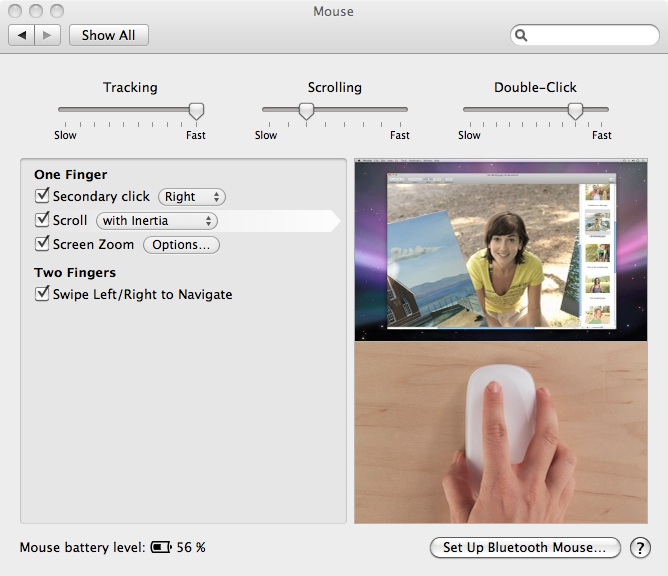
Now let's look at that in Mac OS X:

Click "Mouse."

Mac OS X System Preferences

That's it!

And it comes complete with video tutorials built in and everything:

Mac OS X Mouse Preferences


Thursday, January 6, 2011

Apple setting an example for developers by cutting it's own app prices

The Mac App Store came out today via Snow Leopard update 10.6.6. Apparently, the store contains just about or over 1000 apps to start with more along the way.

Most of these applications have already been available elsewhere, usually straight from the developers website or other repositories among the web. The Mac App Store is certainly an improvement in the discovery and installation of new applications and, hopefully for the end user, cheaper. It seems that Apple is taking the first steps by cutting the prices of its software. From the ability to buy individual iWork Suite applications, to Aperture and Apple Remote Desktop being both dramatically cheaper, it looks like Apple is saying, "You see this, developers? In the Mac App Store people want cheap, so price it low and go for volume."

Add to the fact that any software you buy off the app store is able to be installed and used on any of your personal Macs associated with your iTunes account (I'm assuming up to five, just like with iTunes music), then applications through the Mac App Store look to soon be orders of magnitude cheaper than previously.

We will just have to wait and see, but I'm sure that the price race to the bottom, though definitely slower than with the iPhone App Store, will still happen... what, with being able to compare two apps of similar function right next to one another? It's just like deciding between two deordorants in the aisles of CVS: you see they both say "spring-fresh scent," but one is two dollars cheaper. Which one would you get?

A couple of apps I'm waiting to see drop are like Elgato's Turbo.264 HD Video Converter, Things, iBank, and one app called "alpha" looks pretty interesting -- but it's also $229.99.

Eventually, most all developers will want to find a way to spot their apps in the Mac App Store. Though, I'm not sure technically how complex "pro" apps like Pro Tools or Final Cut Pro can have a simple drop-into-the-dock install process. But seeing how the App Store on the iPhone blew up mobile gaming, I'm wondering just what kind of effect the Mac App Store will bring to the long-neglected gaming platform OS X. In a way, it directly competes with Steam and their game store. We'll eventually see a struggle from some game developers looking to get on the Mac in deciding which store to launch games on. Price wars and competition...

It'll work itself all out, I'm sure.

Thursday, December 16, 2010

How to: Buy your first Mac


Buying your first Mac? Read this.

Thinking about a Mac for a loved one this holiday season? He or she (or you) is very lucky. But if this is the first time you’ve looked at buying a Macintosh computer, there are few things you might want to consider before you decide what to get. While the Apple shopping experience is supposed to be a simple and streamlined process, understanding the Mac as a product and knowing a little about Apple’s marketing will make you a more knowledgeable -- and in the end happier -- Mac customer.

This is an in-depth guide to buying your first Mac. You’ll learn about Apple philosophy, product cycles, price points, the different product lines offered today and how to pick the right Mac for you.

Joining the “cult” of Mac

Welcome to your first experience as a fanboy -- or fangirl. It’s time to join the cult. Okay, so those labels – rhetoric from PC-only users – may be outdated. However, it might be a good idea to know what it means to own a Mac, from then – to now.

Owning a Mac is essential to some people (audio and video professionals like record producers, film editors or graphic designers) where the reliability of Macintosh is irreplaceable. But to everyone else, the Mac is really a luxury item. There are machines that will do almost everything you need for much cheaper, but when it comes down to it, many are inferior and more frustrating to use. It’s like this: some people will use a car – any car – to get from point A to point B, while others like to ride in style and be comfortable each time he or she hops in the driver seat. The same goes for your choice of computer. The Macintosh is like the Cadillac of the computer world, and it’s definitely a fancy ride.

However, just as any minority group is usually ridiculed for being different (fill in whatever stereotype you wish), so too were Mac users, especially in the late 90s to early 2000s. While Apple struggled with business models and flirted with bankruptcy, a closely-knit group of evangelists helped keep Apple afloat. Being the underdog, those who had adopted the Mac in a Windows world were perceived as being cult-like for their die-hard fascination with the product and what it represented. The marketing slogan then, “Think Different,” really drove the idea of belonging to a creative elite -- of belonging to a family.

The Mac today, however, isn’t as much a statement as it is just a really good computer. It works in our complicated, incompatible tech world now more than it ever has. For the most part, people that try a Mac stick with it, fulfilling the prophecy “once you go Mac, you never go back.” Sure, Mac or iPhone users might get the occasional “fanboy” slander every now and then from a disgruntled PC user (which is ridiculous, because most Mac users also use PCs), but those allegations are just about dead. The Macintosh base is extremely large, and Apple as a company is not the underdog anymore. In fact, as of this writing, Apple’s stock market valuation sets them as the most valuable technology company in the world – even above Microsoft.

There’s a reason for this, a reason that Apple has overcome incredible odds and pretty much taken over the tech world in terms of both mind share and the stock market. It has everything to do with the philosophy that drives the products they make.

Apple philosophy 101

Simplicity, ease of use, design, aesthetics, quality… These are terms usually associated with Apple products. While other manufacturers sell based on miscellaneous features and spec sheets, what sets Apple apart is emphasis on great design and aesthetics, build quality, exceptional core functionality and the user experience. Initially, they leave out arguably essential features. This was no more apparent than with the release of the iPhone, which at launch had no 3G networking, a horrible camera, no multitasking, no Flash, no MMS, and others. It still is missing a few wanted features (at least from those in the industry whose job it is to report and complain about Apple).

Steve Jobs has said that his company is product-driven; they want to make the best products in the world – not the best selling or best value, but the best. They are as much a lifestyle company as they are a technology company. They preach originality and design, all the while sometimes outright refuting what is popular or accepted as standard practice in the industry altogether. If it doesn’t align with Apple’s (or Steve Job’s) vision of the future, nobody can tell it (or him) otherwise.

Apple does not follow trends. They set trends. They don’t look to monetize what’s popular, but would rather tear down and rethink what’s already popular. Look at the iPod. Look at the iPhone. Look at the iPad. Hell, look at the Mac when it was introduced. Apple has been intentionally altering the way we look at tech by essentially creating new markets and categories of devices, and advancing the state of the art.

I think it’s a case study for any business student.

However, part of big A’s philosophy takes buying into a relatively closed system. Apple wants you to live in Apple land. While doing what they will to be compatible with the outside world, Apple wants you to live, work and play in their sandbox. They make the hardware. They make the software, the operating system, and they want you to come buy it at one of their retail stores. And they want you to buy your music and media from iTunes, which is joined at the hip with the iPod or iPhone, which is then joined at the other hip with the AppStore and MobileMe… Each product is its own realm of exclusivity.

From this mindset of control comes the idea of user experience. They oversee these aspects of the experience, because they want it to be a good one. The notion of control might seem ominous, but it isn’t inherently bad. There’s a reason why over and over again, Apple ranks the highest among all PC manufacturers in customer satisfaction (link). For the average consumer, every step of buying and using a Mac has been considered and designed.

To contrast, Microsoft creates and markets the Windows software but relies on PC manufacturers and retail outlets to oversee everything else. This is good for wide selection and competitive prices, but it also creates much more room for the consumer to receive an inferior product or service. And it also provides for a much larger disconnect between the company and the user. For some, this strict philosophy means little hardware customization and choice, which makes the Mac less attractive for business and IT markets, or for those who continually upgrade their systems, such as PC gamers.

If you’re interested, I would suggest learning a little Apple history. A few good documentaries on the subject (yes, there are many; it’s an interesting story) are MacHeads, Welcome to Macintosh, Pirates of Silicon Valley, or even Objectified, a documentary on design and aesthetics in everyday life.

What is a Mac?

“Mac” is short for a model of Macintosh computer. It’s a name that has stuck with the product line since the original Macintosh 128k was introduced in 1984. Every product from then on, if it ran the Macintosh OS, was considered a Mac, though the different products in the Mac family had other sub-names like PowerBook or PowerMac.

A Mac, at its core, has little to do with the changing hardware designs from year to year. What makes a Mac a Mac is the operating system it runs: OS X. For the average consumer, there is nothing better. It has an intuitive interface, great overall design, is aesthetically pleasing, and is built to be easy to use, secure and reliable. Snow Leopard is the name given to the current iteration of OS X, and it’s an amazing product. It comes with the iLife suite of applications, such as iPhoto, a photo managing application, iMovie for creating and editing movies, GarageBand and others, all of which make the Mac incredibly capable right out of the box.

The Mac is big in the home, education and creative professional markets. Whichever you hail from, know that there is at least a place for a Mac at your home. And depending on where you work, the Mac is quickly finding a place among the corporate world dominated by Windows PCs.

The right one for you

You’ve probably already got an idea of what you want. Say you need something mobile. Of course, then you’d choose a laptop. Say, then you need something light and capable of handling lots of open windows and word processing programs for productivity. Then you could choose the MacBook or the MacBook Air. Say, but then you also have some graphics-heavy applications you like to run like 3D games. Then you’d probably be better off getting the regular MacBook, because the GPU (graphics processing unit) in that device is a bit speedier.

Here’s a break down of the 2010 holiday season lineup:

Portables:

MacBook – Apple’s mainstream consumer notebook. It fits most use cases and can even handle a few intense 3D games like Half-Life 2. The 13.3-inch screen may be perfect for most people, however, for the video editor or music producer might need a little more screen real estate and possibly even more power.

MacBook Pro – the professional line of notebooks from Apple. While the “Pro” declaration used to apply only to the notebooks with screen sizes 15 inches and over, Apple now has made their previous 13-inch aluminum MacBook a MacBook Pro by adding more RAM, a larger hard drive, and putting FireWire back on the product. This line of computer is capable of much more than any of its mobile offerings. The 15 and 17-inch models contain either one of Intel’s i5 or i7 dual-core processors, both of which are extremely powerful. They all currently use NVidia’s GeForce 320M or 330M GPUs, and are quite capable of the most demanding video editing tasks. The laptops won’t blaze through HD gaming quite like a desktop can, but all can play just about anything, given you adjust game’s graphic settings accordingly. Perfect for the college student, mobile photographer, traveling musician or DJ.

MacBook Air – this was made for two main reasons: 1) to give traveling businessmen and women and super-light, easily portable yet powerful machine, and 2) to show off how thin Apple can make stuff. They’re considerably more expensive for than that of their larger and more powerful brethren, but as said before, with Apple you pay for unique design. And the MacBook Air is definitely unique. It fell under the “Who the hell would use this?” category by critics who didn’t quite understand what Apple was trying to accomplish here. It wasn’t made to be incredibly practical. Instead, Apple figured out how to make super, super thin laptops, and they had to bring it to market first before anybody else. That simple.

Desktop:

Mac mini – There are lot of folks that still ponder the fate of Apple’s least-expensive Mac offering. Over the past few years, there was some talk that Apple might discontinue the mini, but with relatively consistent updates, those rumors have been settled. Especially with it’s most recently design change. The most drastic evolution of the product since its inception, the Mac mini is super tiny and flat and silver and pretty. Though larger in diameter than the previous model, the precision with which Apple can cram so much in such a tiny space is mind-boggling. It’s a wonderful product and a great addition to the Mac lineup. With the Mac mini, the lineup feels complete. Add the fact that no other PC manufacturer really has anything compelling in this form factor, then you might say Apple has the market on this one, but I haven’t seen any market studies directed at this category. There are a few nettop (netbook-desktop) boxes on the market, most notably Dell’s Inspiron Zino HD, but nothing out there shines like the inconceivably tiny yet powerful (enough) box that Apple makes. Many use the mini as a home theater media repository and DVD player, or for internet-based media services like Netflix. They come equipped with an HDMI port, so it’ll hook right up to your flat panel display.

iMac – this is the consumer desktop Mac. It takes on the all-in-one design. That means that the computer is built into the display, or maybe the display is built into the computer. Either way, it’s good. The iMac is a gorgeous device, and it takes the lead in the industry for all-in-ones. That’s mostly because it has a much more competitive edge as far as prices go compared to others. Most PC manufactures thrive on cheaper boxes that ship with separate displays. If you’re thinking about an iMac, just remember that it’s not easily upgradable. You can add extra RAM, and that’s about it. It doesn’t take much to dig into the system and upgrade the hard drive, but I’d leave that to a professional.

Mac Pro – I saved the best for last. This computer is the Mac-daddy (pun intended) of the Mac line. It’s the superbeast among desktop workstations. Starting at $2500 for the box alone, it’s quite an investment, but if you’re able to pony-up that amount of money, you’ll be glad you did. Of course, this assumes you don’t need to be mobile with your computing goals. And I’d say it assumes you are going to be doing a lot of CPU and GPU-intensive tasks like video editing or serious gaming. It also assumes you just need a lot of expansion and a bunch of I/O options to get done what you need done. If not, then I’d probably recommend an iMac, but then again there are those who want the biggest and the baddest. One thing that the Mac Pro has going for it compared to other PC workstations is, again, extraordinary design. If you were to take a good look inside that big beautiful metal box, you’ll witness a perfect balance of seemingly crammed components yet perfect accessibility. Everything just kind of pops out if you need to replace or add something to the system. And when you close it back up, the whole thing screams power and confidence. Overall, the design of the Mac Pro is nearly unchanged the past five to six years, but it also hasn’t lost any of it’s initial luster. That’s saying a lot.

How and when to buy

So, how do you buy a Mac? Well, there’s no easy way to plop a thousand bucks or two on a checkout counter, but there is an informed way, and that’ll make sense real soon.

The first Mac I purchased was a black MacBook, fall of 2007. Having no idea about how Apple marketed and released new products, just a week out of its new packaging, my new laptop was obsolete; Apple had released an updated version that also included the brand-new operating system OS X Leopard. The one I had purchased still had OS X Tiger on it. Flustered and appalled, I ran back to the store, explained my situation and pleaded for an exchange. Luckily, the reseller was empathetic, and I was able to get the newer one a few weeks later. The moral of the story? Know Apple product cycles as well as you can. It’s not an exact science, but based on the patterns of past releases, accompanied with the never-ending rumor mill on the Internet, you can gauge fairly well when it’s about time for Apple to refresh the old stuff and bring in the hot new, spicy Apple pies (sorry for the blatantly horrible pun).

Want to know if it’s a good time to buy a new MacBook? Check some of the dedicated Apple news websites. MacWorld, MacRumors, Cult of Mac, AppleInsider, or even Engadget, Gizmodo, and All Things D (from The Wall Street Journal) always have their ear to Cupertino. In fact, every technology oriented website and media group reports on everything Apple, because even if Apple announced something ridiculous like a battery charger it would be news (wait, they already did that, and it was).

Here’s a great reference from MacRumors; it’s their buyer’s guide, listing all the current main Apple product lines and past releases. From there you can get a sense as to when the best time might be to purchase.

Most often, MacBooks and MacBook Pros and iMacs get refreshed twice a year, but the MacBook Air and the Mac Pro is somewhat harder to pinpoint. Recently the Mac Pro was updated in July, before that was March of 2009. But those looking to buy a Mac Pro would probably not have time to wait for release dates; they’ve got stuff to accomplish, so it’s less an issue. Chances are the MacBook and MacBook Pros will be updated soon. They too have seen a slow-down in update cycles, having only been refreshed once earlier this year. But, I wouldn’t let that keep you from getting one if you’ve been eyeing one for this holiday season. Those laptops are still high-class and won’t be obsolete for quite a while.

The iPhone is really predictable, by this point. Every summer since the original iPhone, Apple has release another one. So, if you want an iPhone 4, get one. Don’t let anyone hold you back.

The iPad, however, is a different story, and the most interesting debate of all. No one knows the iPad’s product cycle yet. They’ve only release one, so we have nothing yet to judge as reference. It was announced January of this year, but released finally in April. Of course, the struggle is whether or not to spend money on the iPad that will quickly be replaced soon or not. Apple sure knows how to play their cards, because they know the demand is still strong for these things. There’s no need thus far to make a new one. Though I’d say this: if you’ve got kids screaming for an iPad this Christmas, by all means shut ‘em up with one of these things, and if it turns out that new iPads come out in January, never let them know it. You can wait for yours, if you have the patience, that is.

Now, I’d rather not blindly speculate on when Apple might release a new iPad, but there are a few things that you might consider: For one, it’s quite certain among tech-gurus that a new version will come out sometime early next year. That means January, April or somewhere in between.

Friday, October 15, 2010

Another reason I absolutely love the Mac

On a PC, the mouse cursor always gets in the way of what I type.

Think about it -- you use your mouse to click inside a text field, but unless the cursor is intentionally moved aside, it interferes with your ability to read what you type. And good luck if a tooltip happens to pop up under the cursor; that blocks pretty much everything. It's like trying to drive a car when all of a sudden someone splashes black paint all over the windshield. Not cool.

On my Mac, as soon as you type, the cursor disappears. Move the mouse again, and voila! It's back! What a simple, nice freaking touch!

However, every time I'm forced to use a PC, either for work or when I use bootcamp for miscellaneous causes, I'm confronted with this horrible oversight in basic design flaw in user experience.

Geez, Windows has been out for thirty some odd years now, and nobody at Microsoft realizes that pointing and clicking has nothing to do typing...