Showing posts with label apple. Show all posts

Thursday, October 20, 2011

Here's what the new cards from Apple's new Cards app look like

When Apple made their new Cards app available last week, I went ahead a cooked up a quick test card and sent it to my younger siblings. The whole process is extremely easy, and it shipped in no time. And the day it was to be delivered, sure enough my iPhone popped a notification letting me know.

The entire shipping time was about two days, and here's the result. The picture are a little crappy because they were taken in low light, but you can tell that the cards are nice while still being very inexpensive. And you can't beat custom-made, personalized cards conveniently shipped for you for only $3 bucks.

Tuesday, July 26, 2011

Thin(ner) MacBook Pros coming...

Had you any doubts? Apple has some ultra-thin MacBooks in the works, and this report from Cult of Mac says that there is at least a 15-inch model in the pipeline right now.

This would line up with my previous speculation that the current MacBook design would soon give way to smaller, MacBook Air-like designs.

As shown by Apple's recently updated MacBook Airs, tremendous horsepower is possible in even the thinnest laptop designs. This report shows that the mid-2011 MacBook Airs rival last year's MacBook Pros, which is no easy feat (I happen to type on a 2010 17-inch MacBook Pro now, and it's no slouch).

Current MacBook Pros carry a design that is almost three years old. It's about time for an update. But seeing as how the current design is already the best in its class, it's hard to fathom just what could be dramatically changed or improved. Well, it seems the old adage "thinner and lighter" will just never go away. At some point, making these notebooks thinner will be like trying to split paper.

Pundits are saying we might see these new models sometime this Fall. I'll be getting one, I'm sure. I dont' even have to see it to know.

Monday, July 11, 2011

Anticipating the axing of optical drives

You want to talk about hunches. I've got one. Mac laptops will soon be optical drive free. It was an obvious removal when the MacBook Air came out. It needed to be thin. But now with the Internet turning more into the omni-present "Evernet" and with more and more software being distributed that way (Mac App Store), Apple has less reasons to keep a such a space-hogging component—not to mention relatively outdated technology—in its mobile systems.

Take, for example, Apple's recent software announcements. Final Cut Pro, Motion, Compressor, and OS X Lion. Any mentions of shipping this stuff on discs? Nope. They are Mac App Store only, so at least they say.

And that's just the cake. Here's the icing. The drives just take up so much damn space. If you open up the back of a MacBook Pro, you'll see that there just isn't anymore room to do what Apple always, always, always wants to do from a design standpoint, which is to make the next generation thinner and lighter. The optical drive takes up at least 20-percent of the internal guts of a 15-inch MacBook Pro, and probably even 30- to 35-percent of the regular MacBook. If any slimming down is going to happen, the only expendable part in the laptop is that of the optical drive.

And here's the cherry to top it all off. Beyond the size and weight improvements the MacBook or MacBook Pro would gain from a DVD-drive exorcism, just imagine the amount of battery life the product could gain. It would be astounding.

Right now seems a perfect time for Apple to come out and say something to the tune of, "Hey, we've got the Mac App Store for software and games, iTunes for music and movies, and you've got the Internet for just about any damn thing else you might could want from an optical drive. So, we've taken it out in order to ship you a thinner and lighter product with much better battery life."

If anything, at least the base model MacBook will see an update soon, and that seems like a perfect test-product to see how well the new, Superdive-less design is received.

Thursday, July 7, 2011

Another reason I love the Mac: ahead of the curve

With the next major release of the Mac operating system, OS X Lion, on the brink of release, I can’t help but realize how much I appreciate the new features coming to my laptop within a few weeks. And I can’t help but notice how archaic and behind the curve Windows seems to be in the same features.

I love the notion of OS X’s new computing paradigms coming in Lion: modal-style, full-screen computing, Auto Save and Resume functions, and Versions (not to mention the beautiful new interface animations and cleanliness). All these things seem like obvious functions of a modern OS, and the idea that our powerful computers have yet to adopt them almost seems silly. Especially now that computers are used by everybody (I mean just about freaking everybody), and not just geeks, means that it’s about time we switch our thinking about what a personal computer is and can be. Why the nerdy notions of “saving," “backing up," and organizing a “filesystem,” not to mention being relegated to the “window” paradigm? Let my computer and applications do all the managing and organizing and backing up of files. It’s smart enough, so why should I have to do it? Besides, regular people hardly feel like learning all that stuff anyway.

The Auto Save, Resume, and Versions features in Lion have much larger implications on personal computing than I think most people realize. And another reason I love the Mac is that Apple is the first to truly implement that stuff across the OS now, giving developers APIs to do the same thing in their apps. But this is not actually new for Apple. The iLife suite that comes on every Mac has been doing this for the past couple of years now, and obviously common productivity apps like iCal and Address Book never required the user to save changes.

But I wonder now, how long will it be until Windows follows suit? I see this simple idea being widely accepted very quickly. And the idea of having to save consistently and duplicate files to have different versions will seem archaic within a few years. Microsoft will probably adopt similar functions in applications sometime in the future.

But right now, they seem really focused on shoehorning Windows onto tablets to care about implementing that stuff. They might surprise me though. It’s happened before.

Tuesday, June 28, 2011

Quit whining about Final Cut Pro X

No happy FCP X
With the release of the completely revamped version of Apple's flagship video editing software, Final Cut Pro, long-time professionals in the industry are acting like old grumps: resistant to change, complaining, and come on Grandpa, let's hear about the good ol' days while we're at it.

This is Apple we're talking about here. You know, the company who's goal it is to reinvent industries ... On a very philosophical level, this company is looking to make it's products more useable, adaptable and affordable by amateurs or professionals alike. When more people can use and understand a product, that makes it more of a success, regardless of how much of it's predecessor it leaves behind.

The new version of Final Cut Pro is not, however, an iterative build upon it's previous self. It is an entirely new piece of software. And regardless of whether or not this release had been an iterative build on FCP 7 (FCP 8?), the entire application still needed a complete under-the-hood rewrite. Among the necessary improvements included making Final Cut completely 64-bit (not easy), adapting it to work with Grand Central Dispatch (OS X's way of managing computing tasks among CPU cores), and switching its user interface API from Carbon to Cocoa. With this type of exhaustive laundry list, why not go ahead and rethink the entire thing?

Using the application, one can see that it borrows heavily from the iMovie way of doing things. From its interface to the managing of projects and media—everything is very iMovie-esqe. This type of editing workflow makes this a very compelling app for "prosumer" users, not the mention the price. At 300 bucks, anybody that can afford a Mac can afford this software. That means that these very capable video tools are available and attainable by the masses, which I believe is Apple's primary goal: make tools available that accomplish what 90-percent of people do 90-percent of the time. The elite 10-percent that need super-duper editing rigs? Stick with what you've got for now. Just because FCP X doesn't fit your needs, it doesn't mean FCP 7 has quit working. You might not be able to buy new licenses, and that's probably an error on Apple's part. But I would still keep an eye on FCP X as Apple adds more features and addresses the complaints that people have of this 1.0 release. And that's just it. This is a 1.0 release (or a 10.0 release to be precise). It's a brand new product.

The biggest complaints for the new release include the lack of multi-camera support, no support for RED footage, and the inability to import older FCP projects. Many have likened this new version of Final Cut to the switch a few years ago from iMovie HD to iMovie '08. During the switch, some features were broken as Apple focused on the ground-up rewrite of the application and entire video-editing experience. Revolutionary or not, that process has taken a little time to get used to, but it has proved well for the app over the past few years. Final Cut Pro X will be the same way. So for those up in arms about this new release, don't use it. Stick to the rivers and the lakes that you're used to.

It's very simple. You cannot expect this release to fit right in to your mega-studio workflow. If anything, Final Cut Pro users should be excited over the fact that their applications aren't just sitting still and withering—the transition will take time for super users while Apple adds features and quells complaints.

As some customers have already said, FCP X is like Apple's "Windows Vista" of the video editing world. And I have to agree. Sure Vista had its issues. But is anybody complaining now about Windows 7 (other than the usual crap that wrong with Windows)? It's a process, and sometimes the upheaval of the old is essential to making the new. Break it down and rebuild...

Sunday, June 12, 2011

What is a "match" in iTunes Match?

iTunes Match is the first service of its kind. Slated to be released later this year, it will take your iTunes library, which is likely full of music ripped from CDs, and match those tracks to copies you can then download from the cloud to all your devices--for $24.99 per year.

That's all well and good, but seeing as how the battle between music label and pirate still wages, I wonder what in iTunes Match will be restricted once they actually flip the switch.

Obviously, the music industry doesn't want to make things any easier for thieves, and clearly, if you have tens of thousands of pirated songs in your library, no company in its right mind should ever give you legitimate copies of those songs for 25 bucks. So, it stands to ask, will there be any type of limitations on this new service?

Consider this: when you click "get info" on a song in your iTunes library, the summary tab shows what type of software was used to encode that track. Many pirated versions of songs will use third-party software and codecs that spit out numerous audio filetypes (LAME, FLAC, etc). But if you have used iTunes to rip a CD, it clearly states that iTunes took care of your cd-ripping duties and even shows which version of QuickTime was used in the process. So, iTunes Match--what exactly will qualify as a legitimate match? Only iTunes-encoded tracks? Or any ol' file type that gets stuck in your library?

As it stands, most people see iTunes Match as a way for pirates to legitimize stolen music—a way to convert anything downloaded from the Internet into pure and true, music label-endorsed tracks, all for about 7 cents a day. I personally hope that's not the case. And given that this seems like a perfectly reasonable and easy way to do so, we'll just have to see how Apple handles this. Above all, I'm just amazed that Apple has been given the green light for this service in the first place.

Sunday, June 5, 2011

WWDC 2011 predictions

WWDC event poster
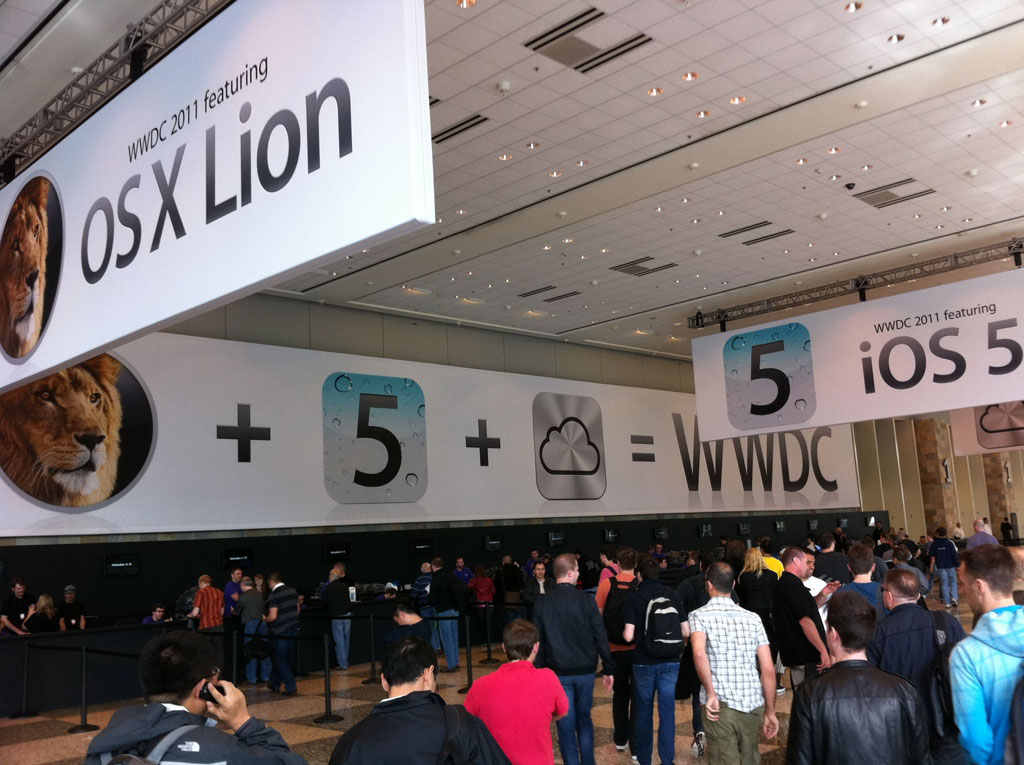
Another year. Another Apple Worldwide Developers Conference. Does that make this year's event any less exciting? Nope. With wild speculation in-tow, here's a run down of things we may see at the event led by Steve Jobs this morning. Some of these things are obvious at this point, and others come solely from the depths of my imagination. First, the obvious stuff: Lion, iOS 5, and the strangely pre-announced new iCloud service.

Lion:
First, Jobs will give us a run-down of all the anticipated features previously discussed and available on Apple's website about the new product (full-screen apps, LaunchPad, Mission Control, Auto Save and Versions, etc...), and also possibly demo some new features we have yet to see.

There is a lot of noise about Apple distributing Lion through the new Mac App Store. I'm behind this prediction 100-percent. For years, Apple has dreamt about a world where they can finally kick physical media to the curb. They will still have disks available, but I think they will offer OS X Lion through the Mac App Store sometime this month, if not today.

iOS 5:
Second, Jobs and his colleagues will show the next version of iOS, and I feel that this will take up most of the presentation. The first of their demos will be on the system integration of third-party Apps throughout the operating system. As some stories have pointed out, Twitter seems to be one of the first Apps to have been given this ability, and a spokesperson from Twitter will come out and talk about how they were contacted by Apple to try out this new API for development. Then Scott Forstall, the VP of iOS software, will explain how this new API will allow for developers to add integrated features throughout the OS for their applications if the user has the app installed on his or her device. However, I think that there should be an option for the user to turn this off if he or she desires.

From MacRumors.com
Remember when third-party apps, cut-copy-paste, and multitasking didn't exist on the iPhone? Well, we screamed and screamed about them, and one at a time they were taken care of. One of the last core things we power-users scream about is iOS's really crappy notification system. This year, I think Apple is going to change that.

It's execution will resemble a drop-down menu from the top of the screen, kind of like a combination between the iOS multitasking UI and the Android notification system. It will store all of your recently received notifications in an un-intrusive list so you can review them at your discretion.

Also to be included, according to reports like this one, is the automatic downloading of app updates. A feature I hope can be turned off if wanted, devices will now automatically update installed apps without the user have to manually tap each update and get thrown to the home screen.

I feel like we might see some UI element and stock app updates as well. Although I am unsure of what that might include, the old widget apps that haven't been touched since the first iPhone are going to either be fully fleshed-out or eliminated or combined into one stock-weather-contacts app. Some reports are saying that the messaging app might be updated. Lastly, I hope but doubt they will include widgets or other glanceable information on the lock-screen or homescreen.

iCloud:
The child of iTunes + MobileMe. It's obvious that we can't carry our ever-growing music and video collections on these tiny devices. The answer to that is storing everything in the cloud. The cut off for storage on iOS devices is 64GB—a sizable but still very limited amount of space. Not to mention, we also use these devices for all kinds of productivity uses, so the ability to have easily available, all one's documents and files in a sort of permanent off-site backup accessible from anywhere is nearly essential nowadays.

Now all these things can actually already be reproduced using and number of different services: Amazon Music, Google's new Google Music beta service, and also things like DropBox and Go To My PC. But still, most of us use and are stuck on iTunes. iCloud, I think is more like a single-source consolidation of all these services that will be functional and easy to use.


How will it be executed though? If you look at the pictures of the iCloud icon, it looks much like an iOS app button. This is kind of hard to imagine, but what if the iCloud service will be consolidated into like an app for access on the iOS platform? The user could pop open the App and browse and stream whichever files or media he or she owns stored in the cloud. The same service will probably work similarly on the desktop too. But hey, I'm no cloud networking genius...

Hardware:
As far as new gadgets go, I actually do think that Apple will release an updated version of the MacBook Air to go along with the release of Lion. It may not even be announced at the event today, but at least be available within the next week or so.

No new iPhone. Having read story after story saying Apple will not announce a new iPhone until Fall, I have to say, I'm thoroughly convinced.

And that'll be it. Now I can't wait until later this afternoon to see just how wrong I, and everybody else, was.

Monday, May 9, 2011

Motorola Xoom: quick, in-store review:

I know this is basically old news now, but I've had this video stored in my phone for over a month, and it was time to finally do something with it.

Hanging out in one of my favorite electronics retail stores, I finally got to play with the introductory Android 3.0 "Honeycomb" tablet—the Motorola Xoom. After using it for a while, I can definitely understand the excitement surrounding the product, especially for people already using Android or who are just all-round, good ol' geeks. But it still has a lot of catching-up to do before it can truly be as mainstream and as competitive as the iPad 2. However, if you are intentionally looking up Xoom reviews, then you are most likely already a supergeek like me and will probably love it anyway.


Interface:
Quite simply, the interface is really, really "geeky." It's kind of like a Star Trek fan's wet-dream, with all kinds of buttons, sliders and controls galore. Or, if you prefer, probably a better comparison would be to the holographic-looking controls of the computer systems in the Matrix trilogy (remember that crazy white control room in The Matrix: Revolutions?). Either way, it's not inherently bad, but considering that this is Google's answer to the iPad makes it a little silly. I say that, because I doubt the general public and target market, which includes kids and grandparents, will want much to do with this if they perceive it as too "techy." That is something that the iPad has going for it, and Apple knows it quite well. And my little sister knows it too. At 8 years old, she uses an iPad with ease, and only on a few occasions has she ever asked for my help to figure something out. Just being as honest as possible, the Xoom, though extremely powerful and harnessing limitless potential, can and will be hard to satisfy such a dynamic range of consumers in the market for which this is to compete.

The biggest complaint I had is the color scheming of the OS and most applications. As is common with Android, almost everything is white text on a black background. And if having a glossy screen wasn't already bad enough, now everything glares so horribly that you constantly have a mirror image of yourself as you use it. Let me just say, this is a real misstep that is easily rectified. I mean, one of the first things taught in design classes is to avoid white-on-black as much as possible. It looks bad. It's hard to read. And here it permeates throughout most of the OS.

Other considerations:
I love Android's multitasking and notifications system, although I thought all the system functions in the little tray menu on the bottom seemed a little confusing. The widgets I thought also may be too small on the home screen, and although the user can customize how it looks, too many widgets can easily make everything really cramped and nearly useless when too much information is laid out in view.

The app selection from the Android Marketplace is ever-increasing, and it includes apps for most of the functions you could want in a phone. Obviously, it will take a little more time to get the types of more immersive app experiences made possible by the higher-resolution screen. Some estimates peg the selection of tablet-specfic apps to around 100. But beyond just numbers, one should hope for and expect some developers to come around and develop something that can compete with Apple's new apps iMovie and GarageBand for iPad. Just as Apple has set to making its own highly developed app experiences, I wonder if Google has anything like that up its sleeve. But, when you think about it, Apple has a long history of music and media appliction development. Google just kinda does web stuff. Not bad—that awesome native Gmail client on the Xoom—but it may be a long while before GarageBand has any competition on the Android side of world.

Competition:
There are some excellent design decisions in this form. It was made to directly compete with the original iPad, which it does quite well. On the spec sheet, the Xoom seems to win: front and back cameras, a dual core processor, larger screen resolution, and a competitive battery life and app selection. But then there is the iPad 2, which kind of sucks the air right out of that spec sheet and makes it a level playing field. The only thing left to really differentiate the Xoom depends on Google and its Android tablet operating system. Honeycomb, as it stands today, has been said to be in a public beta-like mode of development, as Google has even hesitated to release its source code, thought to be for reasons of untidiness underneath the hood. In a rush to get the product to market, Android 3.0 needs to be around 3.5 in terms of manufacturer expectations and feature set and use to really appeal to the widest audience possible.

All in all—it's good, it's powerful, but your grandmother will scoff at it.

Friday, April 22, 2011

The best tech podcast: This is my next Podcast

If you like technology, industry news, and like to laugh, then let me recommend a podcast. It's called This is my next Podcast. The name is odd, I know; it actually refers to an inside joke. But this is the best podcast you can find for your money (it's free). Trust me, you want to give this one a listen.

It features the gang that formerly ran the Engadget Podcast: Joshua Topolsky (seen often on Late Night with Jimmy Fallon), Paul Miller, Nilay Patel, and friends. Informative (sometimes) and entertaining (all the time), I look forward to these guys' ramblings every week. Topolsky, the head geek, is like the that quirky, yet funny friend you like to keep around because there's always something witty on the tip of his tongue. Patel always has an interesting point of view, seemingly able to make really technical stuff easy to understand and digest. And Miller, a little outspoken, attempts to be the logic of the bunch, sometimes succeeding, sometimes not.

Regardless of some shortcomings, there isn't anything better. I've looked. That is until I start my own podcast...

Overall, listening to this podcast is kind of like being delivered a broken or neglected UPS package, but the delivery guy is super funny and cool. You'll look forward to each week just to see what that quirky delivery guy is going to say.

This is my next (website)
This is my next Podcast (iTunes link)

Monday, April 4, 2011

Another reason I love the Mac: scrolling non-active windows

Sometimes when I'm trying to be productive (it happens, I'm sure) I like to have two windows open, going back and forth between them. I often use one window as a reference for another window, say, like when I am writing a paper and need to read something in the browser as a reference.

There comes a time, however, when I need to scroll down in that non-active browser window. On Microsoft Windows (all versions I've tried, including Windows 7), this is not as simple as it should be and can be really irritating if working for an extended period. The user must click on windows to make it active, and then he or she can scroll down using the scrollbars or the mouse wheel.

On a Mac, windows are not required to be active in order to interact with them. If I'm writing that paper and reading a PDF in another window, I just hover the mouse pointer over that window and scroll—no clicking required.

Wednesday, March 30, 2011

Quick thought: iWork is old

If I'm counting correctly, Apple's last iteration of its productivity suite, iWork, is over 2-years-old.

That's really, really old for a major software company to have last put out a major update to one of its key products. The iWork we know today—which is mostly unchanged since January 2009—used to be named "iWork '09." Well, instead of actually releasing an update for the software, which by the way is missing tons of features (styles are still a mess) compared to the Swiss-Army-knife that is Microsoft Office, they have opted to just drop the "'09" from the name.

That's quite an update! At least the title doesn't scream "totally slacking on updating this thing" anymore. Go see for yourself. Open up the Mac App Store, and along the right-hand side you should see a link to the recently updated "iLife '11" suite of apps. Just below that, witness for yourself the '09-less "iWork" link.

Dude, really? And these 2-year-old apps go for $19.99 a piece—60 bucks for the suite?

Don't get me wrong, I love iWork. Because eventually I get exhausted just looking at all the switches and toggles and buttons and controls littering Microsoft Word. And the humble little Pages icon sits in my dock just waiting to save my confused noggin all the trouble.

Monday, March 28, 2011

Mac OS X Beginnings: Cheetah (2001)

From http://web.archive.org and Wikipedia
Finally complete and fleshed-out, and taking suggestions by developers and users, Apple modified and implemented it's first official 10.0 OS release, codenamed "Cheetah" (the big-cat naming system for subsequent releases continues today). Cheetah was the culmination and refinement of brand new ideas—not just an overhaul an older OS—combining a Unix-like Darwin kernel (Google it) with features from NeXTSTEP and specific design elements from OS 9 (like, say, the Finder).

The Cheetah release gave Apple fanatics a new reason to love their computers. Re-invigorated after suffering through the 90s dark ages, Apple and its avid users got a glimpse at the light at the end of the the tunnel.

Release: Mac OS X 10.0 "Cheetah"

Features: first official stable release, completely different codebase from OS 9, new user interface, improved networking, added support for AirPort wireless technology, full PDF support and the ability to create PDFs from any application, the fully-feature Mail application, other essential apps like Address Book and TextEdit, and the Apple logo moved back to the upper left of the menubar.

Drawbacks: A newly-minted OS, the system still had many bugs to be squashed, the interface was criticized for being too slow, and there were a few key features missing like CD burning and DVD playback, which were both available in OS 9.

Price: $129 ($100 for an upgrade from public beta)

Saturday, March 26, 2011

Mac OS X Beginnings: Public Beta (2000)

Though having released the revolutionary iMac in 1998, which featured an entirely new approach to personal computer design, the hip, translucent all-in-one personal computers still featured Apple's then-aging OS 8 and eventually OS 9 software. Behind the scenes, however, Apple had been hard at work completely rethinking the modern desktop operating system. Incorporating the powerful technologies found in NeXTSTEP, Apple developed the what eventually became to be known as OS X.

Thanks to http://pc.watch.impress.co.jp
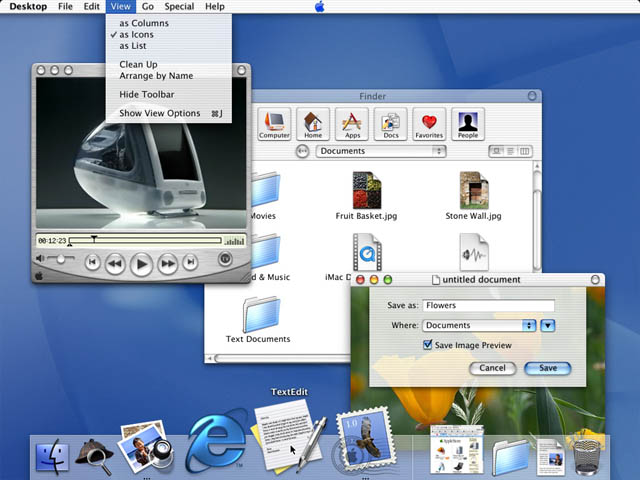
In September of 2000, Steve Jobs stunned audiences with the flashy interface and new features of OS X. With a radically new user interface and software features like QuickTime and Sherlock, people began to look at Macs in a whole new light. The UI skin, called Aqua, did away with dull box-like controls, buttons and scrollbars. Window animations were a completely new experience. The dock created a much different way to quickly get at frequently used applications and documents. Overall, the idea behind OS X was to make everything simpler and easier.

Sure, the fresh, new Mac OS overhaul was buggy (many had said it was nearly unusable), but it was beta. Those that spent the $29.95 knew what they were getting into.

The weirdest thing though was the Apple logo placed in the middle of the top menubar... It was, however, changed back to the top left before the official release of Cheetah.

Release: Mac OS Public Beta

Features: First look at up-and-coming Mac innovations, completely new user interface, preemptive multitasking, memory protection, multiple users, Mail, QuickTime, MP3 software, Sherlock, Internet Explorer.

Price: $29.95

Sunday, March 20, 2011

Perspective: T-Mobile can be bought for $39B, Apple has over $50B in cash.

Pending all the necessary government approvals, AT&T announced today their plans to buy US GSM competitor T-Mobile for $39 billion. Without going into all the politics as to whether or not this is overall a good idea or benefit to consumers, I felt it was worth mentioning just what $39 billion dollars can actually purchase.

Though a follower of all things tech, I have a not-so-unique fascination with Apple, that company which sells those i-Thingies. Pretty much everyone is just as fascinated as I when Apple steals headlines for each shiny new toy. And one thing that most people know as of late is just how quickly Apple's cash reserves seem to continuously build. Last reports have their cash piles weighed in at a cool $51 billion. That's a heck of a lot of money. What drives journalists even crazier than the mind-boggling number alone is that nobody knows for sure what Apple plans to do with it. There have been some guesses; however, most of us sit and wait for them to take over the world.

But let's take another look at that number: $51 billion. In pure cash. No debt. A market valuation soon to pass Exxon to be the most valuable company in the world. And unlike the animosity most have toward Exxon, Apple and Steve Jobs have been named the most admired and loved company and CEO of last decade. What does all this mean? It means that that pile will continue to grow, and all the while Apple seems to have the highest restraint not to impulse-buy any thing they like, say, a leading wireless provider...

Of course, that's not their bag, being a carrier, but it does offer some perspective as to just what they're capable of doing with that money. Maybe they could buy Microsoft?

Monday, March 14, 2011

Good times with the iPad 2

Continuing to explore the awesomeness that is the iPad, here's a video I shot a couple days ago using the new HD camera on the iPad 2. Then I edited, created transitions, added music, and exported the clip entirely in the new iMovie app:


I'm super impressed with iMovie's fluid and fast functionality. I'll post a video shortly to demo it's interface and speed. To give you an idea of how well it works: I own a 17" MacBook Pro with an 2.53 Intel i7 processor. The iMovie software on the iPad feels faster than that laptop when working with the same resolution and bit-rate video. That's saying a lot; it's a freaking tiny tablet.

Sunday, March 13, 2011

Kids, GrandParents and those in between agree: the iPad rocks

The wait is finally over. I got one. The iPad 2 went on sale at 5 p.m. this past Friday, and I walked out of a local Apple reseller with a black 32 WiFi model at 5:20 p.m.

Twelfth in line, I had only been waiting for about an hour and a half, which is a very different story than our friends to the north. In New York City, a woman sold her spot at the front of the line at the Fifth Avenue Apple store for a cool $900. I don't think I could have sold my spot for anything over 20 bucks here in Georgia.

Either way, I've been using the iPad 2 consistently for the past 48 hours, and I must say, it's great. And it's not just great, it's GREAT (I know, I hear Tony The Tiger too). The only other way to describe it... well, I can't describe it. Nobody can truly "get it" until he or she tries one—and not just tinkering in the store kind of trying one. No, give it about three to four hours. Then, it all becomes obvious; reading news and websites, browsing, watching, learning, playing, discovering, app-ing (?), and getting immersed in content on the iPad 2 is a different and altogether better experience. Not that it takes time to learn, but in about that timeframe, using gestures and common UI functions across apps become second nature, and everything seems natural. Compared to using the keyboard and mouse and the seemingly "disconnected" screen, the more obvious touch-what-you-want interface is intuitive and will define our main personal computing devices for years to come.

I understand the hesitation, why the iPad's usefulness is in question. Hell, I passed on the first one, and not because I didn't have the money; I just didn't see how much use I had for it. Prior to standing in line with the other fanboys Friday, a family member asked me what I could do on the iPad that I couldn't already do on my iPhone or MacBook Pro. In all truthfulness I said "Nothing," to which she laughed at. I tried the explaination, to no avail, "It's not what you can do with it, but how you do it."

But later that evening I was able to show her. After a short demo, she and my grandfather were in disbelief. I showed her a few preloaded apps like PhotoBooth and video recording. Then I demoed how the videos and pics get loaded into an album that you can share or use as a standing picture frame. Next I showed her the internet, pulling up her own hearing aid business website in the Safari browser. A flash video that would normally play on the front page was missing, but that didn't stop her from admitting that website and text looked "unbelievably clear," even for those with dwindling eyesight. Lastly, touching the Maps icon on the home screen brought up a big green image of our United States. To pinpoint our location I tapped the icon in the top that looks like an paper airplane, and within seconds we were looking at a satellite image of our building. Now, you should be careful when showing the next feature to the elderly; their hearts may not be able to take it. I touched the icon for Street View. When the iPad zoomed down and allowed me to pan around and look at the entrance to our location, I heard my grandfather make a strange noise. It sounded like "Gugh!"

Put shortly, the iPad alters the perception of what a computer is. Previously complex and disconnected, traditional PC interaction has been revamped, re-imagined, redesigned, and revolutionized. Ask the millions of kids learning and playing games on it. Ask the college students with easy access to all the information in the world at their fingertips. Ask anyone with an insatiable reading habit who can take an entire library of books on the road. Ask my grandparents. If computers connected to the internet are windows to the outside world, then Apple is using the best darn glass cleaner there is.

Friday, March 11, 2011

Robot play's iPhone game, guarantees you won't reach the top of the leaderboard


Watching a robot work its iPhone gaming skills—well that reminds me why I should never expect to make it to the top of any leaderboards in the iOS Game Center.

Beyond that, it also seems to show off just how responsive the iPhone touchscreen really is. In the video, the 1to50 game requires the player to tap numbers in succession as fast as humanly possible. But the iPhone, being a robot itself, can adapt to speeds only robotically possible, which is quite impressive. I'd like to see an Android phone up to this task—even a brand new one at that, not like this rustic iPhone 3G we see here.

Now, if only I could use a robot to type my emails for me...

Wednesday, March 2, 2011

All eyes on Apple... the iPad 2 [u]

Here we go, just ten minutes before the iPad 2 announcement and whatever else might be in store for us tech-hungry savages.

My predictions, if I must guess, will be a revamped, slightly redesigned iPad with a thinner body and at least a front facing camera for FaceTime. I'm going to go out on a limb and say that there won't be a back camera—for reasons I'm not quite sure of. I only suggest that because it seems odd to hold up a large tablet device to take pictures with. And I'm not sure Apple thinks that would be so user-friendly.

For the internals, I'm guess a faster processor, updated graphics performance—what chip they'll use for graphics is beyond my ability to even guess—but I'm sure we'll see something like the "A5" somewhere in the presentation. And there will most definitely be more RAM—512MB at least.

As for the display, I doubt a retina display will be any part of the new iPad. That's just way too many pixels for such tiny hardware and battery to be able to support well—at least for the time being.

My next guess is that it will surely be sporting some new version of iOS, though I doubt iOS 5 will be ready just yet. If so they do show iOS 5, it will be a preview of the OS and only available on new iPads once they're release a month or so from now, which leads me to my next prediction:

The updated iPad won't be immediately available for purchase, rather that Apple will allow pre-orders starting today on their website for shipment later this month or sometime in April.

And lastly, I doubt Apple will rename the iPad as "iPad 2." Instead, they'll opt for "the new iPad" to label their tablet product.

We'll see how all this turns out in just a few minutes...

Update:

Well, it looks like I was right on a few things and wrong on a few things...

The iPad 2 is redesigned with a thinner body, it does have a FaceTime camera, the A5 chip with faster graphics and CPU performance, no retina display, no iOS 5, and it won't ship immediately.

However, I was wrong, first and foremost, on the name. It is called "iPad 2," and not "the new iPad." Although it's worth noting only the word "iPad" is etched into the back of the iPad 2, much like how the word "iPhone" has remained the only label on the back of each iPhone iteration. And though I had not thought about it, there will also be a white version available for launch along with the black version.

Next, there is a camera on the front as well as the back unlike I had predicted. And apparently the back camera is capable of HD video of 720p.

Some of the biggest improvements to the iPad that nobody had been aware of was the addition of iMovie and Garageband for iPad. Both multimedia software suites are incredibly advanced—and not just for a small tablet device. Both new Apple-developed apps rival high-dollar desktop apps in capability and diversity of available effects and software instruments. I'm extremely excited to try them out, being a musician and occasional film editor. To top it all off, each of these apps are to be available with the release of iPad 2, both for an incredible price of $4.99 each.

With software advances like these, Motorola and Android tablet competitors have to be shaking in their cubicles.

Other things of note are the PhotoBooth software, the new case/cover design, the HDMI output (which is freaking awesome), more AirPlay support in other video apps, HomeSharing of iTunes material over WiFi for iPad, and 17K new book titles available on the iBookStore thanks to a deal with Random House Publishing, Inc.

Looks like they're not allowing pre-orders yet. All the fun begins all at once next Friday, March 11. Sales of the iPad start at 5 p.m.

Any let downs?

I personally don't like the look of the device from the back. That also might be a reason they didn't quite reveal the back too often during the presentation. There seem too many switches and holes scattering the super-flat, bland looking back. The fact that it's thinner is kinda lost on me. Seems like just getting the thinnest it can possibly be doesn't make much sense when that new available space could be used for a bigger battery for an ungodly amount of battery life.

And I think that will do it. You'll see me in line this go-around at an Atlanta Apple store.

Sunday, February 27, 2011

What will Apple name the forthcoming iPad?

What will apple name the next iPad? That might seem like a moot question, but it's worth asking. Let me explain.

Take a look at the recent MacBook Pro refresh. The new models weren't renamed "MacBook Pro 16," rather keeping the "MacBook" label and sticking "new" in the front. And as for the different iPod lines, renaming occurs here and there, but Apple had never used numbers to any of those updates: iPod, iPod Mini, iPod Shuffle, iPod nano, iPod Touch, and remained so through each product's life-cycle. Also, the current and completely redesigned Apple TV is still called the "Apple TV."

The iPhone, however, proves a deviation to that rule. The first iteration was called "iPhone," then "iPhone 3G," then "iPhone 3GS." Only now have they resorted to numbers with the naming of the iPhone 4.

So, is Apple already in the position of numbering of iPad refreshes? Or will they stick to appending the word "new" in front of the next update?

One hint that Apple might choose "iPad 2" lies in the invitations they sent out this past week, which show an iOS calendar app icon with the date March 2. From the corner, the page is peeled back to show an iPad, foreshadowing the now-obvious next-gen iPad announcement.

At a quick glance, the graphic even looks like it says "iPad 2."

It might be worth looking at whether or not Apple chooses to adopt the names the public already dubs their unreleased products. Though in no way a science, it might make sense from a marketing standpoint to keep the name people have already chosen for the next iPad—not to mention to differentiate the new product from the older one, especially if it's redesigned in any way.

All I know is that I've been waiting too long to buy one; I was late to the game in deciding if I had use for one. But after I had enough time to play with a few and realized that carrying around my 17" MacBook Pro was more of a hassle than I anticipated, the lust for that 64GB 3G iPad crept up not too long ago—when it would make no sense to buy one in the face of a forthcoming new iPad. Or iPad 2. Or whatever.

Tuesday, February 15, 2011

New tablets play "Me Too!" to the iPad

A recent look at the TouchPad, HP's new long-needed foray into the tablet market and HP Slate replacement, had me marveling at how similar every new tablet is, copying and switching each other's ideas to the point of indistinguishability.

Obviously, Apple hit it big with the iPad. And regardless of how "underwhelming" and "just-a-big-iPod-touchy" it seemed, it's now what every other company strives to be in this new, very competitive market. Sure, the TouchPad is different, and it still keeps its Palm underpinnings and UI cues that make it beautiful, polished and compelling, but a closer look at it reminds me so much of Android reminds me so much of Win7 tablets reminds me so much of everything else in the market since CES 2011. In essence, Apple is playing a big "I told you so" game as the rest of the world tries to keep up. Oh, the beauties of competition bring us the fruits of technological innovation, which are more or less nothing more than expensive grown-up toys, but I digress...

You always wonder what they will come up with next. Remember when you looked at the Motorola Razr and wondered just how cell phones could possibly get any smaller or better? Well, that's what tech companies do too. except that they make money and pay engineers to do it. Sooner or later someone will totally rethink something that will and should redefine the market, but as of late, that company is Apple. And it's not because they simply have better teams behind them and better marketing, it's just that have taken much bigger risks and put a hell of a lot of effort into market-altering products. Don't think that just because HP bought Palm and are now using their webOS platform that some brilliant engineers had not designed some amazing concept products that would, however, never see the light of day. Just look at the Courier concept that supposedly came from the Microsoft labs. In those situations, companies just didn't take the massive risk to put their resources into something that their market research told them nobody would buy.

Which brings us back to the iPad. It was a product announced to a world that knew of it's existence for nearly a decade. However, the loudest voices in the media said it wasn't good enough. There were no iPad focus groups. Apple developed the product blindly for years, as they so with nearly everything they make. That's a risk only few are willing to take.

Then what does everyone else still do? Well, just sit back, wait and watch a burgeoning new market explode and Apple again dominate a new arena. What and then after the wait-and-see approach to product development, it takes a year for anyone to come up with anything remotely compelling. Well, it's about damn time.

The HP TouchPad. The Motorola Xoom. The BlackBerry PlayBook. And, God-willing, a Microsoft product that doesn't use Windows 7 (Windows Tab 7, maybe?). These are the devices that may finally help us breathe in an Apple-drowned world. I don't care what it is, I just want it to be good and innovative.

Just have the balls, tech companies, to do something great and quit following in Apple's shoes.