
But when I see less computer-literate family and friends wondering how to change their security settings or uninstall a program, the Windows Control Panel is cryptic.
It's interesting that people who have never used a Mac just assume that computers will be difficult to use and never look at it any other way; they assume themselves less capable to figure out how to get what they need from their machines. They are perfect examples of folks that need to look at Apple's offerings, if they can afford it.
As Windows adds more features, the options for tweaking those features grow and grow. However, that seems to unfortunately correspond with its complexity of use. Though Microsoft has altered the way they list these options, giving an abstract category view, you'll notice how much is left out and still troubling from a design standpoint.
I'll show you the difference between altering settings through the System Preferences panel on a Mac and the Control Panel, and let you decide which seems the less complicated...
Lets start with a simple option of changing some of the mouse settings.
In Windows, you start at the Control Panel in it's default category view, as it looks in Windows 7 Home Premium: (You can click these images to view them full size)
 |
| Control Panel in Windows 7 |
Obviously, the mouse should be under "Hardware and Sound." Well, that would be obvious if you are aware that the mouse is considered hardware yet not at all related to sound...
Next we're presented with this new page and all its options in the "Hardware and Sound" page:
 |
| Hardware and Sound Control Panel |
Okay, so far so good. Do you see "Mouse" anywhere? Look real hard. It's the word that says "Mouse," in case you were confused, under "Devices and Printers."
Let's just assume your grandmother made it this far.
Another click on "Mouse" gives us an entirely new control panel and lots of tabs:
 |
| Windows 7 Mouse Properties |
If all those steps were too confusing, you could always navigate through this stuff -- the Large Icon view (make sure you know your ABC's and exactly how the Windows operating system would list what it is you're looking for):
 |
| Control Panel Large Icon Views |
Now let's look at that in Mac OS X:
Click "Mouse."
 |
| Mac OS X System Preferences |
That's it!
And it comes complete with video tutorials built in and everything:
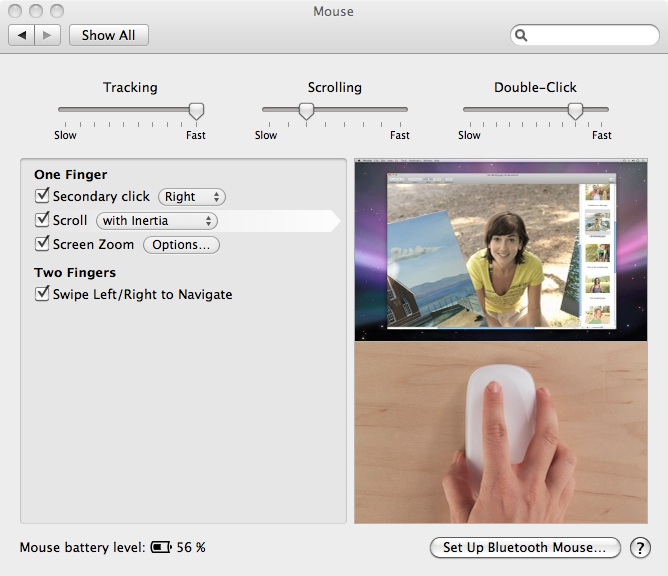 |
| Mac OS X Mouse Preferences |


