Wednesday, March 30, 2011

Quick thought: iWork is old

If I'm counting correctly, Apple's last iteration of its productivity suite, iWork, is over 2-years-old.

That's really, really old for a major software company to have last put out a major update to one of its key products. The iWork we know today—which is mostly unchanged since January 2009—used to be named "iWork '09." Well, instead of actually releasing an update for the software, which by the way is missing tons of features (styles are still a mess) compared to the Swiss-Army-knife that is Microsoft Office, they have opted to just drop the "'09" from the name.

That's quite an update! At least the title doesn't scream "totally slacking on updating this thing" anymore. Go see for yourself. Open up the Mac App Store, and along the right-hand side you should see a link to the recently updated "iLife '11" suite of apps. Just below that, witness for yourself the '09-less "iWork" link.

Dude, really? And these 2-year-old apps go for $19.99 a piece—60 bucks for the suite?

Don't get me wrong, I love iWork. Because eventually I get exhausted just looking at all the switches and toggles and buttons and controls littering Microsoft Word. And the humble little Pages icon sits in my dock just waiting to save my confused noggin all the trouble.

Monday, March 28, 2011

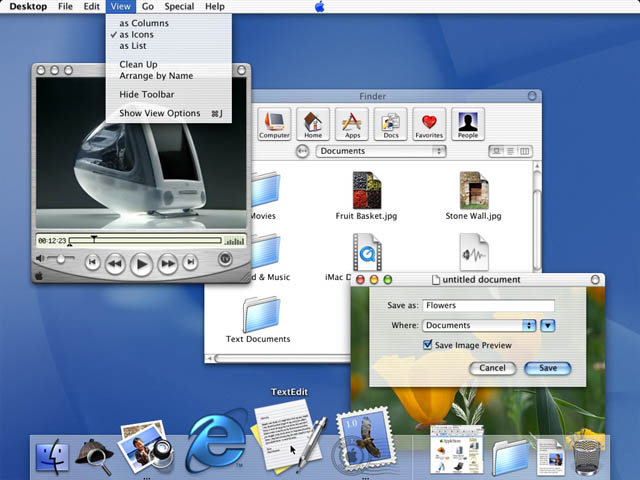
Mac OS X Beginnings: Cheetah (2001)

From http://web.archive.org and Wikipedia
Finally complete and fleshed-out, and taking suggestions by developers and users, Apple modified and implemented it's first official 10.0 OS release, codenamed "Cheetah" (the big-cat naming system for subsequent releases continues today). Cheetah was the culmination and refinement of brand new ideas—not just an overhaul an older OS—combining a Unix-like Darwin kernel (Google it) with features from NeXTSTEP and specific design elements from OS 9 (like, say, the Finder).

The Cheetah release gave Apple fanatics a new reason to love their computers. Re-invigorated after suffering through the 90s dark ages, Apple and its avid users got a glimpse at the light at the end of the the tunnel.

Release: Mac OS X 10.0 "Cheetah"

Features: first official stable release, completely different codebase from OS 9, new user interface, improved networking, added support for AirPort wireless technology, full PDF support and the ability to create PDFs from any application, the fully-feature Mail application, other essential apps like Address Book and TextEdit, and the Apple logo moved back to the upper left of the menubar.

Drawbacks: A newly-minted OS, the system still had many bugs to be squashed, the interface was criticized for being too slow, and there were a few key features missing like CD burning and DVD playback, which were both available in OS 9.

Price: $129 ($100 for an upgrade from public beta)

Saturday, March 26, 2011

Mac OS X Beginnings: Public Beta (2000)

Though having released the revolutionary iMac in 1998, which featured an entirely new approach to personal computer design, the hip, translucent all-in-one personal computers still featured Apple's then-aging OS 8 and eventually OS 9 software. Behind the scenes, however, Apple had been hard at work completely rethinking the modern desktop operating system. Incorporating the powerful technologies found in NeXTSTEP, Apple developed the what eventually became to be known as OS X.

Thanks to http://pc.watch.impress.co.jp
In September of 2000, Steve Jobs stunned audiences with the flashy interface and new features of OS X. With a radically new user interface and software features like QuickTime and Sherlock, people began to look at Macs in a whole new light. The UI skin, called Aqua, did away with dull box-like controls, buttons and scrollbars. Window animations were a completely new experience. The dock created a much different way to quickly get at frequently used applications and documents. Overall, the idea behind OS X was to make everything simpler and easier.

Sure, the fresh, new Mac OS overhaul was buggy (many had said it was nearly unusable), but it was beta. Those that spent the $29.95 knew what they were getting into.

The weirdest thing though was the Apple logo placed in the middle of the top menubar... It was, however, changed back to the top left before the official release of Cheetah.

Release: Mac OS Public Beta

Features: First look at up-and-coming Mac innovations, completely new user interface, preemptive multitasking, memory protection, multiple users, Mail, QuickTime, MP3 software, Sherlock, Internet Explorer.

Price: $29.95

Thursday, March 24, 2011

Mac OS X beginnings: NeXTSTEP

Now a decade after its first release, now’s the time for some nostalgic Mac OS X goodness. Let’s take a look at the Mac’s most far-reaching and advanced operating system from inception and infancy to its now very adult-like capabilities and features.

OS X beginnings: NeXTSTEP

NeXTSTEP screenshot thanks to kernelthread.com
If you weren’t aware, the OS X Snow Leopard we know and love today was actually birthed from an operating system developed during the late-1980s to mid-1990s called NeXTSTEP. NeXTSTEP, from the Steve Jobs-owned company, NeXT, was an more modern multitasking operating system and well ahead of its time. However, bundled with capable though very expensive hardware, NeXTSTEP struggled to gain marketshare with competing “workstation” computers, and eventually Microsoft Windows became the preferred platform in both business and consumer markets.

Apple, then a competing company for Steve Jobs, also faced the same struggles. And by the mid- to late-1990s, Apple was desperate for a solution, as their main product line, the Macintosh, was no longer as competitive because of its aging, single-user and single-tasking operating system, OS 9.

An agreement was made. Apple bought NeXT, and with it all the advanced technologies within the NeXTSTEP operating system. With Steve Jobs back at Apple as an interim-CEO, and with NeXTSTEP in tow, Apple got to work on the next generation of OS called OS X. That’s “X” for “ten.”

Next post, we'll look at the brainchild of these efforts, OS X 10.0—aka Cheetah.

Here's a video of Steve Jobs demoing NeXTSTEP 3, the last major iteration of the operating system software:

Sunday, March 20, 2011

Perspective: T-Mobile can be bought for $39B, Apple has over $50B in cash.

Pending all the necessary government approvals, AT&T announced today their plans to buy US GSM competitor T-Mobile for $39 billion. Without going into all the politics as to whether or not this is overall a good idea or benefit to consumers, I felt it was worth mentioning just what $39 billion dollars can actually purchase.

Though a follower of all things tech, I have a not-so-unique fascination with Apple, that company which sells those i-Thingies. Pretty much everyone is just as fascinated as I when Apple steals headlines for each shiny new toy. And one thing that most people know as of late is just how quickly Apple's cash reserves seem to continuously build. Last reports have their cash piles weighed in at a cool $51 billion. That's a heck of a lot of money. What drives journalists even crazier than the mind-boggling number alone is that nobody knows for sure what Apple plans to do with it. There have been some guesses; however, most of us sit and wait for them to take over the world.

But let's take another look at that number: $51 billion. In pure cash. No debt. A market valuation soon to pass Exxon to be the most valuable company in the world. And unlike the animosity most have toward Exxon, Apple and Steve Jobs have been named the most admired and loved company and CEO of last decade. What does all this mean? It means that that pile will continue to grow, and all the while Apple seems to have the highest restraint not to impulse-buy any thing they like, say, a leading wireless provider...

Of course, that's not their bag, being a carrier, but it does offer some perspective as to just what they're capable of doing with that money. Maybe they could buy Microsoft?

Monday, March 14, 2011

Good times with the iPad 2

Continuing to explore the awesomeness that is the iPad, here's a video I shot a couple days ago using the new HD camera on the iPad 2. Then I edited, created transitions, added music, and exported the clip entirely in the new iMovie app:


I'm super impressed with iMovie's fluid and fast functionality. I'll post a video shortly to demo it's interface and speed. To give you an idea of how well it works: I own a 17" MacBook Pro with an 2.53 Intel i7 processor. The iMovie software on the iPad feels faster than that laptop when working with the same resolution and bit-rate video. That's saying a lot; it's a freaking tiny tablet.

Sunday, March 13, 2011

Kids, GrandParents and those in between agree: the iPad rocks

The wait is finally over. I got one. The iPad 2 went on sale at 5 p.m. this past Friday, and I walked out of a local Apple reseller with a black 32 WiFi model at 5:20 p.m.

Twelfth in line, I had only been waiting for about an hour and a half, which is a very different story than our friends to the north. In New York City, a woman sold her spot at the front of the line at the Fifth Avenue Apple store for a cool $900. I don't think I could have sold my spot for anything over 20 bucks here in Georgia.

Either way, I've been using the iPad 2 consistently for the past 48 hours, and I must say, it's great. And it's not just great, it's GREAT (I know, I hear Tony The Tiger too). The only other way to describe it... well, I can't describe it. Nobody can truly "get it" until he or she tries one—and not just tinkering in the store kind of trying one. No, give it about three to four hours. Then, it all becomes obvious; reading news and websites, browsing, watching, learning, playing, discovering, app-ing (?), and getting immersed in content on the iPad 2 is a different and altogether better experience. Not that it takes time to learn, but in about that timeframe, using gestures and common UI functions across apps become second nature, and everything seems natural. Compared to using the keyboard and mouse and the seemingly "disconnected" screen, the more obvious touch-what-you-want interface is intuitive and will define our main personal computing devices for years to come.

I understand the hesitation, why the iPad's usefulness is in question. Hell, I passed on the first one, and not because I didn't have the money; I just didn't see how much use I had for it. Prior to standing in line with the other fanboys Friday, a family member asked me what I could do on the iPad that I couldn't already do on my iPhone or MacBook Pro. In all truthfulness I said "Nothing," to which she laughed at. I tried the explaination, to no avail, "It's not what you can do with it, but how you do it."

But later that evening I was able to show her. After a short demo, she and my grandfather were in disbelief. I showed her a few preloaded apps like PhotoBooth and video recording. Then I demoed how the videos and pics get loaded into an album that you can share or use as a standing picture frame. Next I showed her the internet, pulling up her own hearing aid business website in the Safari browser. A flash video that would normally play on the front page was missing, but that didn't stop her from admitting that website and text looked "unbelievably clear," even for those with dwindling eyesight. Lastly, touching the Maps icon on the home screen brought up a big green image of our United States. To pinpoint our location I tapped the icon in the top that looks like an paper airplane, and within seconds we were looking at a satellite image of our building. Now, you should be careful when showing the next feature to the elderly; their hearts may not be able to take it. I touched the icon for Street View. When the iPad zoomed down and allowed me to pan around and look at the entrance to our location, I heard my grandfather make a strange noise. It sounded like "Gugh!"

Put shortly, the iPad alters the perception of what a computer is. Previously complex and disconnected, traditional PC interaction has been revamped, re-imagined, redesigned, and revolutionized. Ask the millions of kids learning and playing games on it. Ask the college students with easy access to all the information in the world at their fingertips. Ask anyone with an insatiable reading habit who can take an entire library of books on the road. Ask my grandparents. If computers connected to the internet are windows to the outside world, then Apple is using the best darn glass cleaner there is.