Showing posts with label design. Show all posts

Sunday, March 13, 2011

Kids, GrandParents and those in between agree: the iPad rocks

The wait is finally over. I got one. The iPad 2 went on sale at 5 p.m. this past Friday, and I walked out of a local Apple reseller with a black 32 WiFi model at 5:20 p.m.

Twelfth in line, I had only been waiting for about an hour and a half, which is a very different story than our friends to the north. In New York City, a woman sold her spot at the front of the line at the Fifth Avenue Apple store for a cool $900. I don't think I could have sold my spot for anything over 20 bucks here in Georgia.

Either way, I've been using the iPad 2 consistently for the past 48 hours, and I must say, it's great. And it's not just great, it's GREAT (I know, I hear Tony The Tiger too). The only other way to describe it... well, I can't describe it. Nobody can truly "get it" until he or she tries one—and not just tinkering in the store kind of trying one. No, give it about three to four hours. Then, it all becomes obvious; reading news and websites, browsing, watching, learning, playing, discovering, app-ing (?), and getting immersed in content on the iPad 2 is a different and altogether better experience. Not that it takes time to learn, but in about that timeframe, using gestures and common UI functions across apps become second nature, and everything seems natural. Compared to using the keyboard and mouse and the seemingly "disconnected" screen, the more obvious touch-what-you-want interface is intuitive and will define our main personal computing devices for years to come.

I understand the hesitation, why the iPad's usefulness is in question. Hell, I passed on the first one, and not because I didn't have the money; I just didn't see how much use I had for it. Prior to standing in line with the other fanboys Friday, a family member asked me what I could do on the iPad that I couldn't already do on my iPhone or MacBook Pro. In all truthfulness I said "Nothing," to which she laughed at. I tried the explaination, to no avail, "It's not what you can do with it, but how you do it."

But later that evening I was able to show her. After a short demo, she and my grandfather were in disbelief. I showed her a few preloaded apps like PhotoBooth and video recording. Then I demoed how the videos and pics get loaded into an album that you can share or use as a standing picture frame. Next I showed her the internet, pulling up her own hearing aid business website in the Safari browser. A flash video that would normally play on the front page was missing, but that didn't stop her from admitting that website and text looked "unbelievably clear," even for those with dwindling eyesight. Lastly, touching the Maps icon on the home screen brought up a big green image of our United States. To pinpoint our location I tapped the icon in the top that looks like an paper airplane, and within seconds we were looking at a satellite image of our building. Now, you should be careful when showing the next feature to the elderly; their hearts may not be able to take it. I touched the icon for Street View. When the iPad zoomed down and allowed me to pan around and look at the entrance to our location, I heard my grandfather make a strange noise. It sounded like "Gugh!"

Put shortly, the iPad alters the perception of what a computer is. Previously complex and disconnected, traditional PC interaction has been revamped, re-imagined, redesigned, and revolutionized. Ask the millions of kids learning and playing games on it. Ask the college students with easy access to all the information in the world at their fingertips. Ask anyone with an insatiable reading habit who can take an entire library of books on the road. Ask my grandparents. If computers connected to the internet are windows to the outside world, then Apple is using the best darn glass cleaner there is.

Sunday, January 23, 2011

New iPhone 4 screws makes a mountain out of a molehill

Apple's recent decision to alter the default type of screws that hold the iPhone 4's case shut has suddenly received a lot of attention. iFixit, an indispensable website and a company I adore, put out this PSA-type video, voicing their woes associated with Apple's new "pentalobe" screws.

Apparently, if you take your iPhone 4 into an Apple Store for repair, after opening the case, the Geniuses behind the Bar replace those common Phillips screws with something a little less easy to bypass.

Everyone seems to be against Apple on this, and I too don't see it that necessary to change screw types, if only because if somebody really wants to open their iPhone, I'm pretty sure they can find a way. In fact, some have already found that a simple flathead screwdriver can do the trick.

However, my problem with all this is that iFixit and most other folks in the media are missing an important point completely. As iFixit claims, "Once I've purchased it, it's mine to do with as I please." I agree with that. But HELLO! Do you guys have any clue about the idea of subsidization? When someone buys an iPhone at a subsidized price of $199, they don't entirely own that phone. AT&T owns part of that phone. Then you have to pay it off for the next two years by contract.

While in those first two years the purchaser doesn't entirely own that iPhone, Apple, who takes care of the cost of repairs in almost any incident of its demise, wants to look after those phones just as much as the user. Because, while covered by AppleCare, if you reach in that phone that you, Apple and AT&T all partially own, and screw it up, why should it then fall on Apple to pay for the user's ignorance?

What bother's me more is the apocalyptic-type wording iFixit likes to use in this video. For one, it's a "diabolical" plan to "screw" your iPhone. Yes, simply changing screw types is so like, evil and stuff, right? And of course it will "screw" it up -- your iPhone -- I mean, your iPhone that also still belongs in part to AT&T. Secondly, as iFixit says, it's also an "insidious" way to "sabotage" their own product. Oh please...

Besides, they're just screws.


Thursday, January 20, 2011

Another reason I love the Mac: Control Panel vs System Preferences

Have you ever taken a good look at the control panels in both Windows and OS X? When I used to be a die-hard Windows user, the XP-style control panel and all its options I looked at as an advantage, where a user can have much control over his or her machine. And as a nerd, sorting through those complicated options I found a necessary evil.

But when I see less computer-literate family and friends wondering how to change their security settings or uninstall a program, the Windows Control Panel is cryptic.

It's interesting that people who have never used a Mac just assume that computers will be difficult to use and never look at it any other way; they assume themselves less capable to figure out how to get what they need from their machines. They are perfect examples of folks that need to look at Apple's offerings, if they can afford it.

As Windows adds more features, the options for tweaking those features grow and grow. However, that seems to unfortunately correspond with its complexity of use. Though Microsoft has altered the way they list these options, giving an abstract category view, you'll notice how much is left out and still troubling from a design standpoint.

I'll show you the difference between altering settings through the System Preferences panel on a Mac and the Control Panel, and let you decide which seems the less complicated...

Lets start with a simple option of changing some of the mouse settings.

In Windows, you start at the Control Panel in it's default category view, as it looks in Windows 7 Home Premium: (You can click these images to view them full size)

Control Panel in Windows 7
Here you are presented with a category view of the different options of things you can change. We're look for mouse settings. Scanning through the headings and then their subheadings, try and decern where the mouse might be hiding. Or look at it this way: You are your grandmother, for just a moment (and if your grandmother is dead, just pretend you're old and unsure about all this technological stuff).

Obviously, the mouse should be under "Hardware and Sound." Well, that would be obvious if you are aware that the mouse is considered hardware yet not at all related to sound...

Next we're presented with this new page and all its options in the "Hardware and Sound" page:

Hardware and Sound Control Panel

Okay, so far so good. Do you see "Mouse" anywhere? Look real hard. It's the word that says "Mouse," in case you were confused, under "Devices and Printers."

Let's just assume your grandmother made it this far.

Another click on "Mouse" gives us an entirely new control panel and lots of tabs:

Windows 7 Mouse Properties
Alright! You did it! And now you can go through this mess to change what you want, if you know what you want...

If all those steps were too confusing, you could always navigate through this stuff -- the Large Icon view (make sure you know your ABC's and exactly how the Windows operating system would list what it is you're looking for):

Control Panel Large Icon Views
Okey doke!

Now let's look at that in Mac OS X:

Click "Mouse."

Mac OS X System Preferences

That's it!

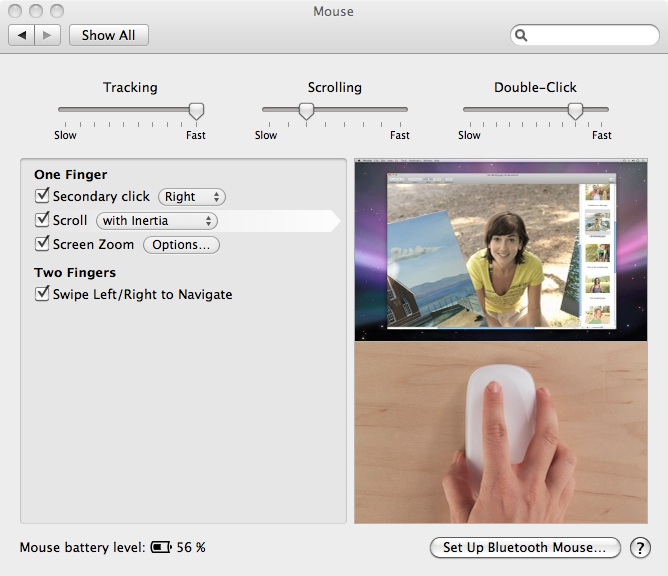
And it comes complete with video tutorials built in and everything:

Mac OS X Mouse Preferences


Saturday, November 20, 2010

How to touch a Lion: OS X

To be quite honest, I'm a little worried about Apple's position on touch in their desktop platform, OS X.

Currently, touch on OS X is employed using Apple's proprietary blend of gesture-based devices: the Magic TrackPad, Magic Mouse, and of course the MacBook trackpad. That's all great, but, looking toward the future, the point-and-click method of input, while effective at its job, is beginning to look a little antiquated in the face of touch-based devices like the iPad. I'd only hope that when the next thing comes around -- when we do figure out what the paradigm shift would be in desktop computing -- that Apple will be on top of it.

In the October 2010 keynote, Steve Jobs spoke a little about Apple's position on touch interfaces in the desktop/notebook category. He said basically that those vertical display orientations don't work well with extended use. "It gives great demo," Jobs claimed. But he then went on to describe the problems concerning arm fatigue and extended use problems associated with that design. "It's ergonomically terrible," he said.

That all makes sense, and I admire Apple's ability to deny the status-quo in desktop touch interfaces, and that's not what worries me. Instead, I'm curious about the integrity of their current interfaces for touch on OS X. The MacBook trackpad, Magic TrackPad and Magic Mouse are great devices, but they are in no way comparable to interacting with the touchscreen on the iPhone or iPad. Apple says the best way they've found to get touch on the Mac is not through the display, all which orient vertically, but rather through those horizontal devices they already ship.

I wanna touch me some OS X

While the trackpads and the Magic Mouse that Apple ship do make use of "gestures," they are not "touch" interfaces like touchscreen displays. The software in OS X is still based on a point-and-click mechanism of interaction. So, I guess the argument should be whether Apple should rewrite the desktop OS for fingers. Well, if you look at the recently previewed OS X Lion, they are already taking steps in that direction. With the LaunchPad, which uses the entire screen to display app icons, its use of folders like iOS 4, and also the introduction of more intuitive fullscreen apps (doing away with windows and the tiny toolbar controls), the desktop OS is gradually gaining the user interface necessary for finger-to-display interaction.


I wonder if the desktop OS, in its current form, will ever use touch as efficiently as any of the iOS or Android handsets on the market now. For example, straight from the horses mouth, check out this patent from Apple describing an iMac that has the capability to flip down horizontally, presumably to solve the whole "vertical orientation" problem.

My, how we've grown

Also, while always pondering the next best thing, I simply wonder when the traditional point-and-click style of desktop navigation will eventually go away. First there was command-line interfaces which included nothing but a black screen and a prompt. You would then enter commands to navigate and launch programs. From there, the paradigm shift in computing came with graphical user interfaces, or GUI. Xerox had initially invented GUI, but it wasn't until the Apple Lisa computer was released that it had made its way to the mass-market. From there, the Macintosh perfected the modern desktop operating system, and every other OS and software manufacturer, like Microsoft, jumped on the bandwagon.

More than thirty years later, we've since grown into our modern OS's and coincidentally seemingly grown too used to the same interfaces we use to interact with our data. It didn't take long to realize that command prompts were antiquated, but now we're slowly realizing that touch, along with wireless mobility, is the way of the future.

And in that aspect, the future is already here. With the introduction of the iPhone, we witnessed touch, wireless and mobile culminate with a product that not only revolutionized the cellular industry, but also energized new ideas and catalyzed a new category of mobile devices like the iPad. Tablet computing is the new rage, and we may see that form-factor take as the reigning personal device after the PC.

Bring it 'Back to the Mac'

I have to agree with Jobs on the iPad. There is something "magical" about it. The iPad brings a degree of intimacy with the internet and your digital content that other devices simply don't quite offer yet, all of which is because of the touch interface, its simplicity, design and ease of use. So, how do you bring some of that intimacy to the Mac? Laptops, in their current form, definitely don't work for vertical touch, because the displays are too flimsy and have no support for the pressure required someone to press against it. Hmmmm...

However, with the new MacBook Air, they've taken design cues from the iPad hardware, so I guess that's a good first step. It's easier to, say, just throw in flash storage rather than a hard drive, giving your laptop a new "instant on" feature resembling the iPad. But it's much more to try and reinvent the OS. Although OS X Lion seems to promote a more app-friendly, iPad-like experience with the new Mac App Store, the LaunchPad and fullscreen apps, in the meantime we're stuck with the Magic Mouse to provide our desktop "touch" experience.

We'll have to wait and see what the industry will make of this, because I certainly don't have the answers.

Saturday, November 6, 2010

On the iPhone, pt2

Previously, I've spoken a little bit about the iPhone, its place in history and impact on modern communication, which can be found here. To get all my ideas out about the iPhone and why I’m a complete fanboy of the device (and to be honest, of most Apple products), I hope to expand a little here and possibly more down the line along the device’s evolution with this segment simply titled, “On the iPhone.”
Tech isn’t so “techy” anymore
You geeky son-of-a-bitch. Yeah, you know you love your phone. It’s okay; we do too. The thing is, tech isn’t so geeky anymore, so be proud of it. The 21st century Fonzie uses an iPhone -- style, fashion and social status today include both the devices you carry and the brands that define you. Are you a Mac or PC? Android or Blackberry? Playstation or Xbox?
Modern geekism, as I see it, has more to do with phones than anything, as phones are everyone's device and the most personal tech we own. And Apple, having always considered beauty and style in their products, are responsible for the new age of stylish gadgetry with the introduction of the iPhone in 2007.
Revolution
Smartphones have evolved. Initially created for business professionals, the smartphone was nothing more than an excuse for guys in suits to carry around expensive, complicated-looking gadgets.
Well, that may be an exaggeration, but in all honesty, having used Windows Mobile devices from the early 2000s, I can vouch for smartphone uselessness beyond fancy contacts management a digital calendar. Mobile internet, which was finally starting to mature in devices like Blackberrys and the Palm Treo, was essentially still a baby. The Treo, Blackberry and a few Nokia products were certainly key devices in a pre-iPhone world, but until the platforms could be rethought and reinvented for use by mere mortals, nobody cared.
But why prop up the iPhone?


Well, because, if it wasn’t for the iPhone, your Motorola Droid simply wouldn't exist.
Android, Palm and now Windows Phone 7 -- platforms based on the touch-experience -- are all reaching full maturity and offer plenty competitive alternatives. But regardless of whether you believe the iPhone is still king or have instead found a better fit for you, no one can deny that Apple truly catalyzed a new generation of really personal, really smart mobile devices and software. Facing many obstacles, they created something so radically different and did it so well, that the iPhone introduction will go down as a historical upward shift in portable computing (not to mention that the MacWorld 2007 keynote given by Steve Jobs was awesome and sure to be talked about for decades among us Apple nerds. Gotta give kudos when kudos is due (what is a kudo, btw?)).
The iPhone’s backstory is really the most compelling part of its introduction. And though Jobs likes to claim revolution for the products he introduces, for the people that own iPhones, use them and love them, the overall consensus on whether or not the iPhone is truly revolutionary amounts to an assertive “hell yes.”
Read this piece from Wired magazine, The Untold Story: How the iPhone Blew Up the Wireless Industry. This is the best piece I’ve found on the device, the landscape of the mobile industry and how it was flipped upside down in 2007.

It’s all about emotion

Talk with iPhone users. They love it. They make sure to use the word.
It’s just a phone -- an electronic gadget. So why the emotional connection? How can a person become so floored with a phone, of all things?

Well, making calls isn't it. The phone part of your iPhone doesn't make you fall in love. Especially if you have lots of dropped calls, sometimes you might be inclined to throw it across the room. However, the process of making the call, the fluidity and ease involved can overall make for a relatively enjoyable experience. That is what it's all about: the experience, the enjoyment one receives in its use with minimal frustrations.

Emotional connectivity with a phone comes in the sense that the device simply fulfills and need. Or more appropriately, it creates need, whereas technology, in its nature, broadens connectivity with the world by providing new avenues for information and entertainment, and then fulfills it. The iPhone platform, in form and function, exists to satisfy that need and, in turn, influences the "bond" a person will perceive from its use.

Just as an interesting side-note, we are only talking about a phone, in case we need to be reminded. We talk about the iPhone experience like one might talk about a religious experience. But I'm sure one's choice of technology might come close to a religion. They call 'em fanboys for a reason.

So, let's first discuss design. It's no secret that Apple has a great design team; they've won awards and sold enough product to prove it. Apple stuff is often described as "pretty" or even "beautiful." But why? It's nothing by a hunk of shiny metals and glass. To answer, you might look at these objects in comparison to what others manufacture. Take, for example, any slew of Nokia handsets or Windows Mobile phones from last year. Other than, in my opinion, the Palm Pre and a few HTC handsets which are on par with the iPhone as far as physical design, the iPhone trumps most in outward attractiveness. Being shiny certainly has an eye-catching allure and makes you wanna reach out and touch it -- or even lick it.


Handsets. You hold them -- yes, in your hand, if you had to guess. So, the feel of the device must conform to the hand or be ergonomically sound for constant touching and manipulation. The slickness of the iPhone (still speaking of the original) -- the rounded-off sides and smooth edges that fit nicely in the creases of one's fingers, the serene physicality of having only one button, the weight and feel of the device -- all adds to the proverbial "experience" we like to adorn it with.

Physical beauty is nice, and Apple has always made really nice hardware, but as Steve Jobs had said in The Wall Street Journal's D5 conference in 2007, he really considered Apple a software company more than anything. Software is what sets a company like Apple apart and drives the identity of their products. The software in the original iPhone was revolutionary (okay, I'll reuse the word). During the MacWorld 2007 keynote, Jobs threw the phrase "desktop-class applications" around to describe the new era of portable computing. The iPhone was the initiator and proof of that concept. Now with the App Store and over 300,000 (as of this writing) applications for iOS devices, uncertainty over software utility in the mobile space can be easily put to rest. However, while the capabilities are there, pure functionality of the iPhone is not what creates the bond between it and the user. Design, again, must creep into the conversation, because the way we see, feel and hear -- all ways we interact -- must, beyond all, be easy and fun to do. The designers at Apple have nearly perfected user interface design.

It works well. Like, for real. As long as the hardware is keeping up with the software (because the hardware should be able to handle what interface and general computations the applications need), the interface, its animated aspects, the types of buttons and controls, the graphics, the layout of information all in a tightly-wound, polished and responsive package make for a fluid and extremely satisfying experience.

It's late, and this post has run long. To be continued...